01 / AURORA Ai
Start the day with Today
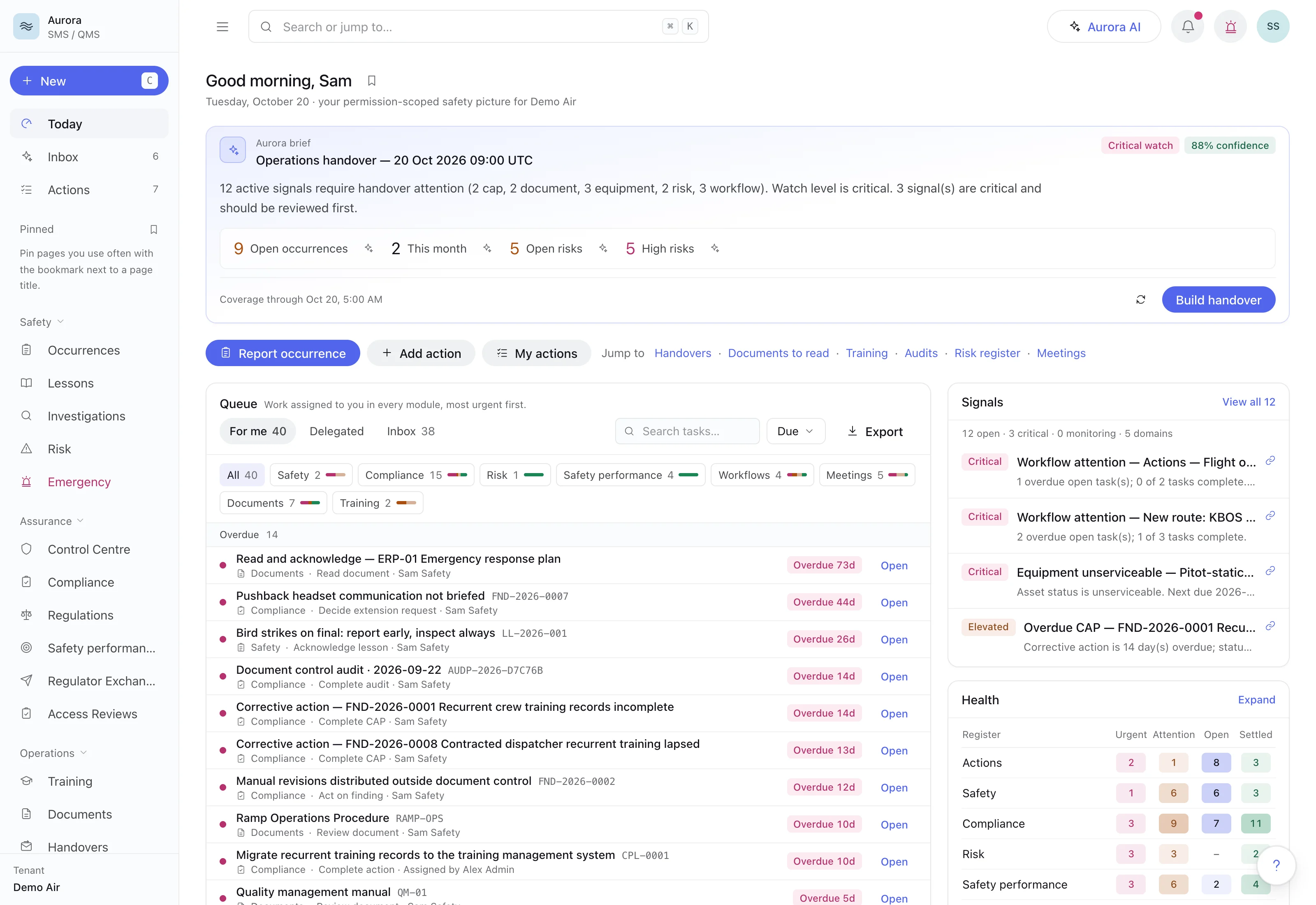
One queue for everything assigned to you across the modules, most urgent first, under a brief assembled by rules from live records. Synthetic demonstration data.
AURORA Ai is standalone aviation SMS and QMS software that gives airlines and aircraft operators one place for confidential safety and security reporting, mandatory occurrence reporting, bowtie risk assessment, audits and findings, safety performance indicators, management of change and controlled documents. Each person starts the day with one queue of their work across every module, live risk scores give no credit to a barrier whose assurance check has lapsed, and a safety case closes only after independently verified corrective action and separate Safety Manager and Accountable Manager sign-offs.
Email me the brochure, AURORA Ai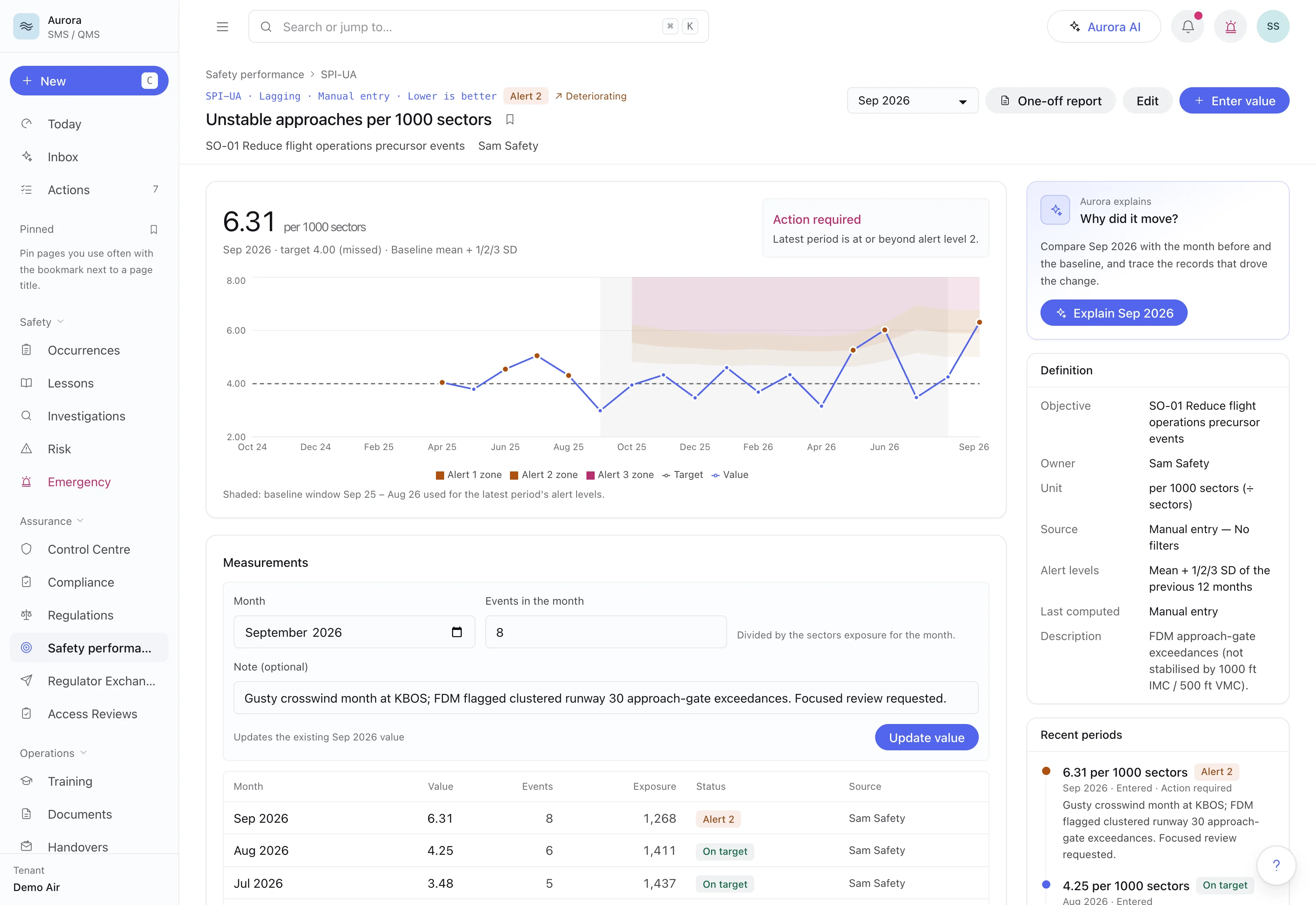
AURORA Ai is FlightAtom's aviation SMS and QMS software: one standalone safety and quality management system for airlines and aircraft operators. It covers confidential occurrence reporting with mandatory occurrence report tracking, bowtie risk assessment, audits and findings, safety performance indicators, management of change, controlled documents and crew training readiness. A safety case closes only after independently verified corrective action and sign-off by both the Safety Manager and the Accountable Manager.
AURORA Ai scores every threat-to-consequence path: prevention barriers lower a threat's likelihood, recovery barriers lower a consequence's severity, and the highest-scoring path sets the exposure. The live score gives a barrier no credit while its assurance check is lapsed or ineffective.
Explore the current product interface with demonstration data. Open any screenshot for a closer look.
One queue for everything assigned to you across the modules, most urgent first, under a brief assembled by rules from live records. Synthetic demonstration data.
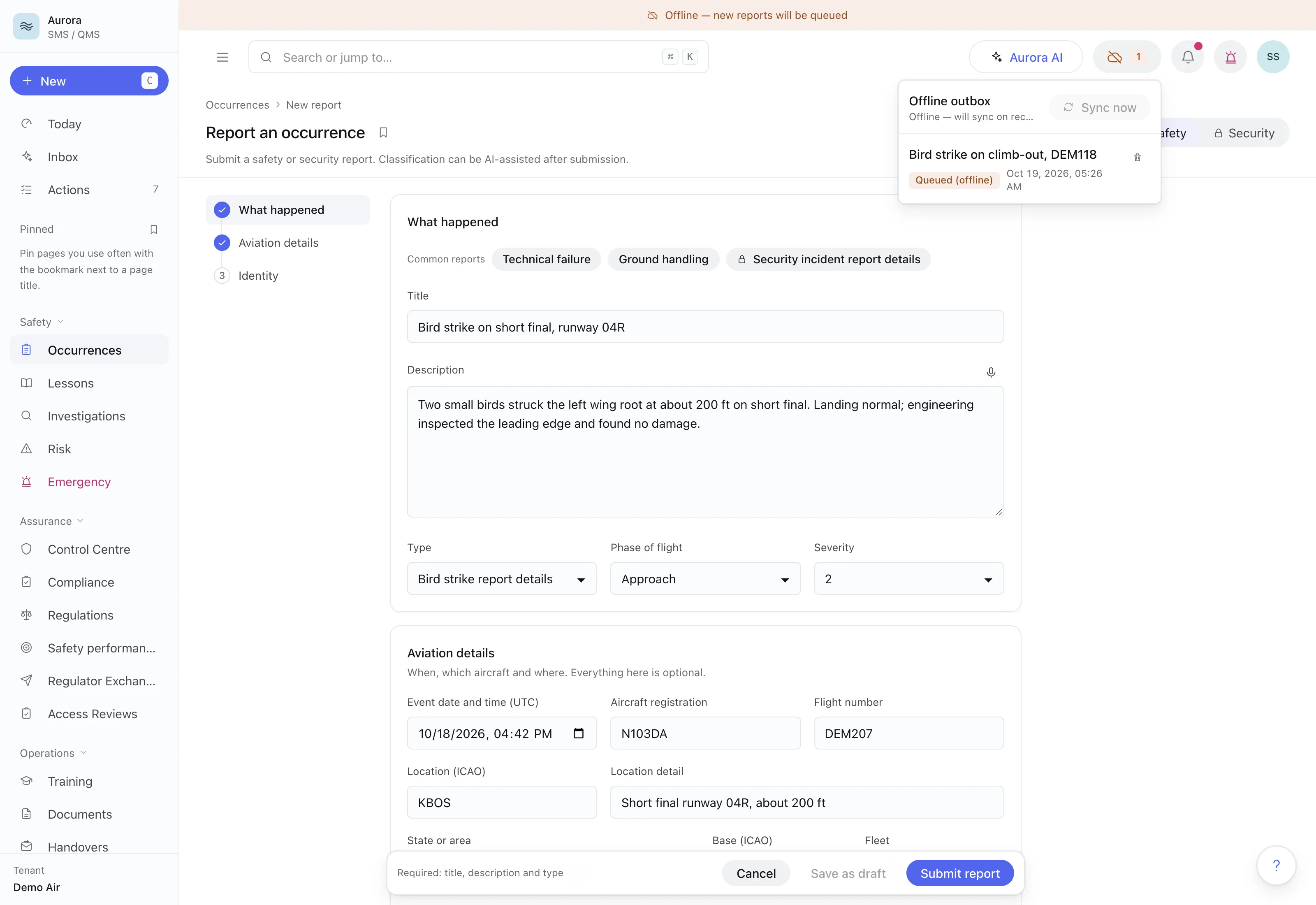
Offline, a named bird-strike report waits in the outbox and sends once the connection returns, while the next one is written on the same form, which separates safety from security reports. Synthetic demonstration data.
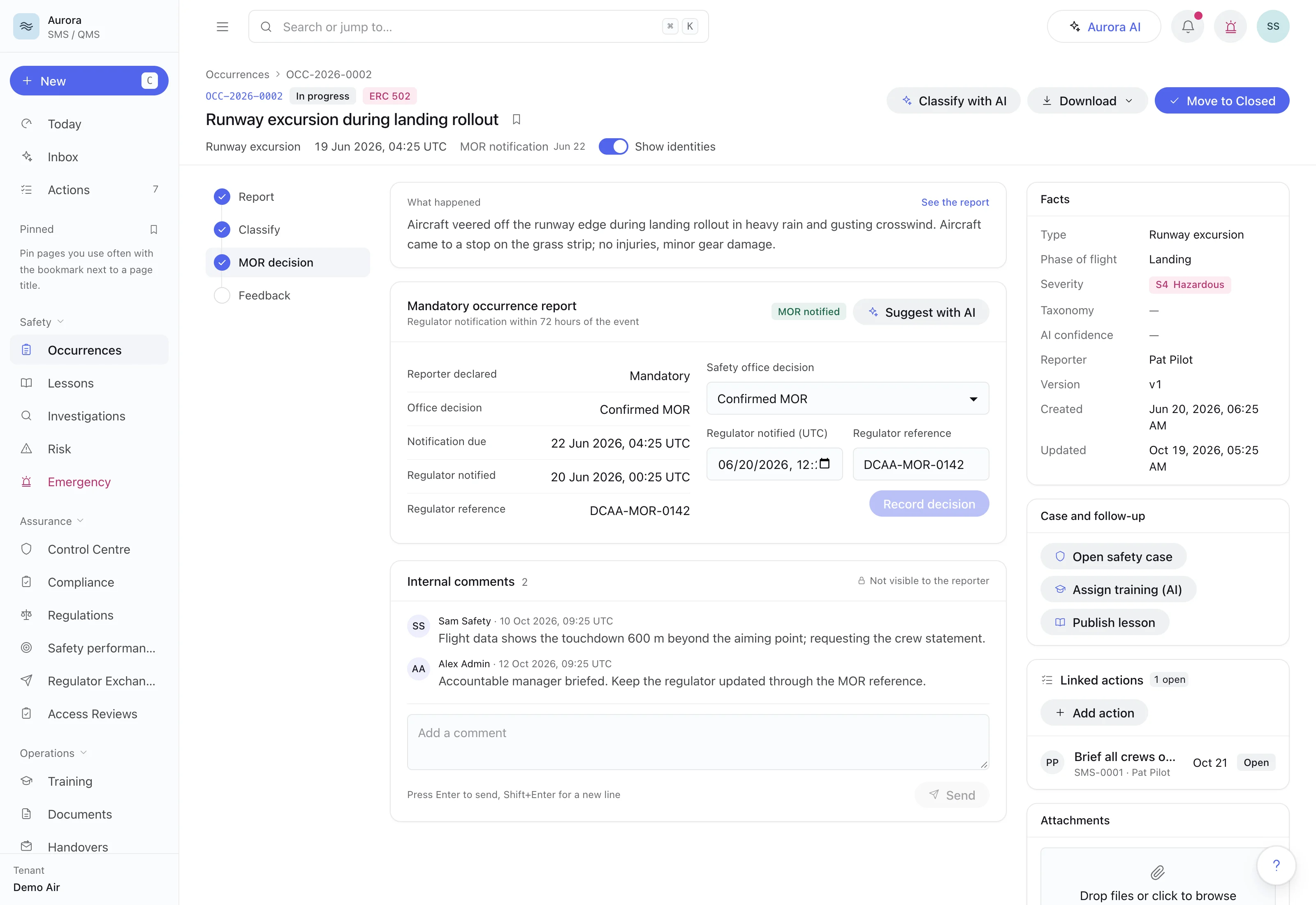
A runway excursion carries its event risk class (ERC 502) and a confirmed mandatory report, with the 72-hour due time, the recorded notification and the regulator's reference. Synthetic demonstration data.
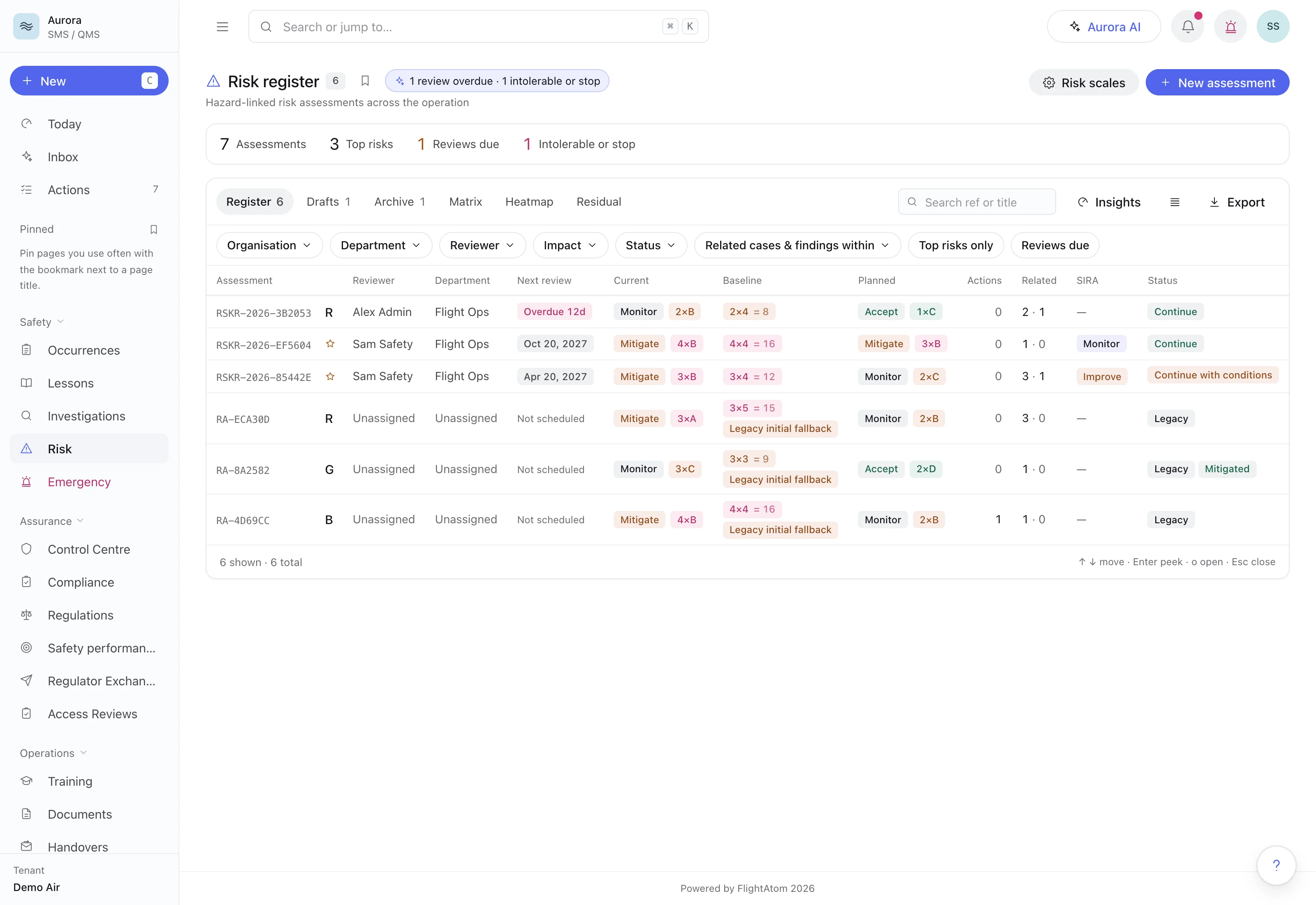
Each assessment shows the approved baseline, the current score and the score its planned controls should reach, with its review date and a decision to continue, continue with conditions or stop. Synthetic demonstration data.
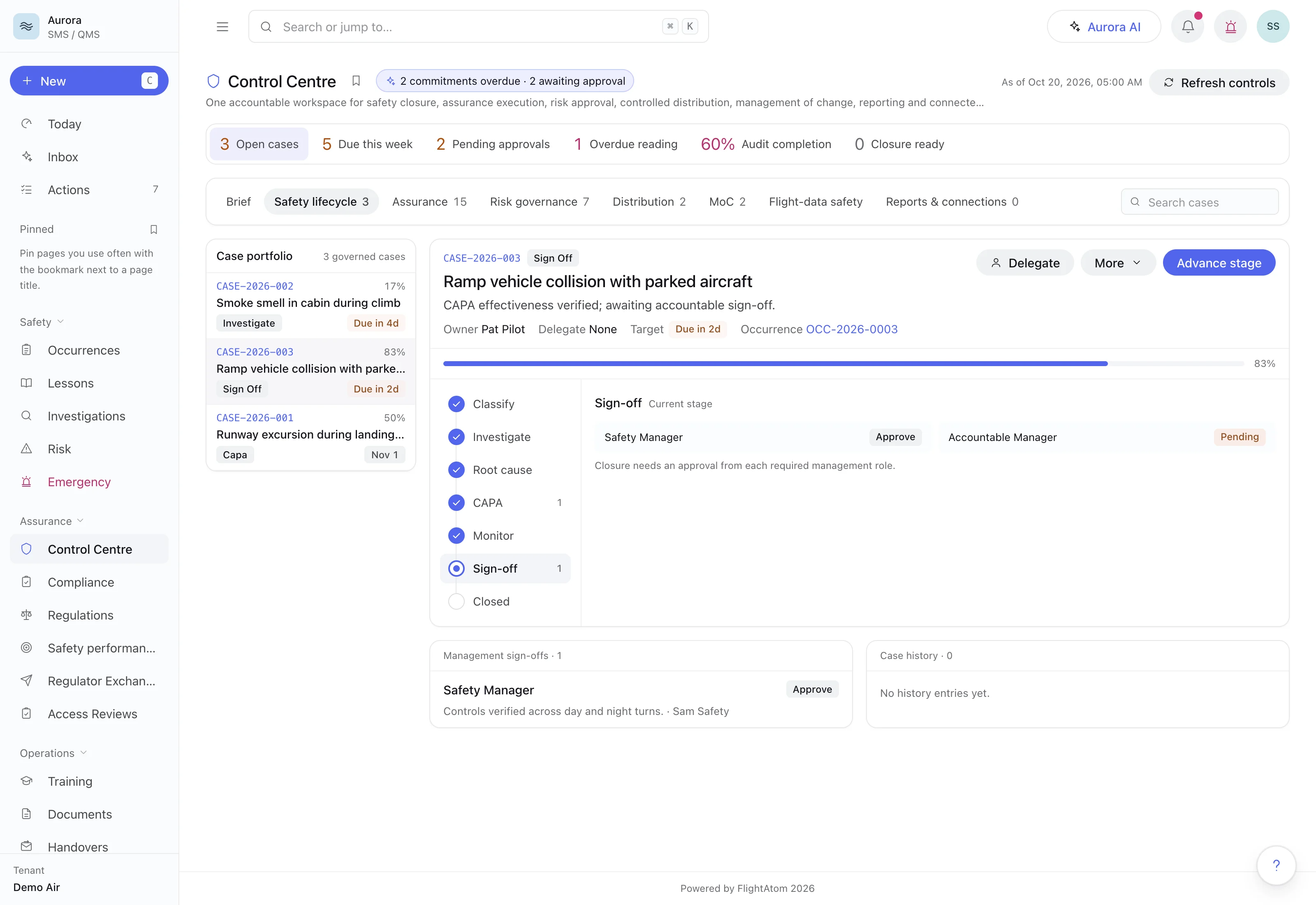
A ramp-collision safety case with verified corrective action has the Safety Manager's approval and still needs the Accountable Manager's sign-off before it can close. Synthetic demonstration data.
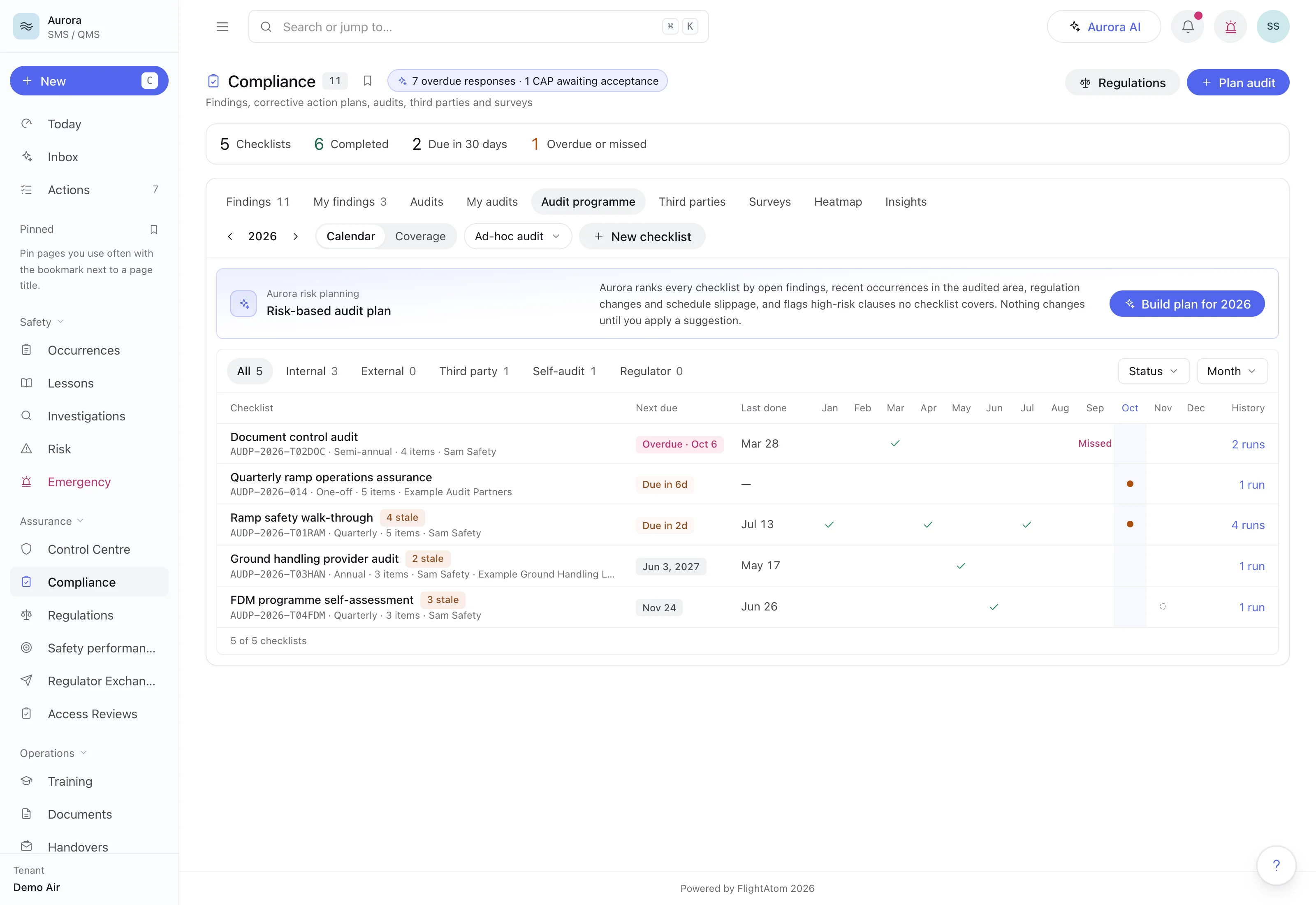
Recurring internal and outside audits sit on one calendar, where a missed run and checklist questions that have gone stale are flagged. Synthetic demonstration data.
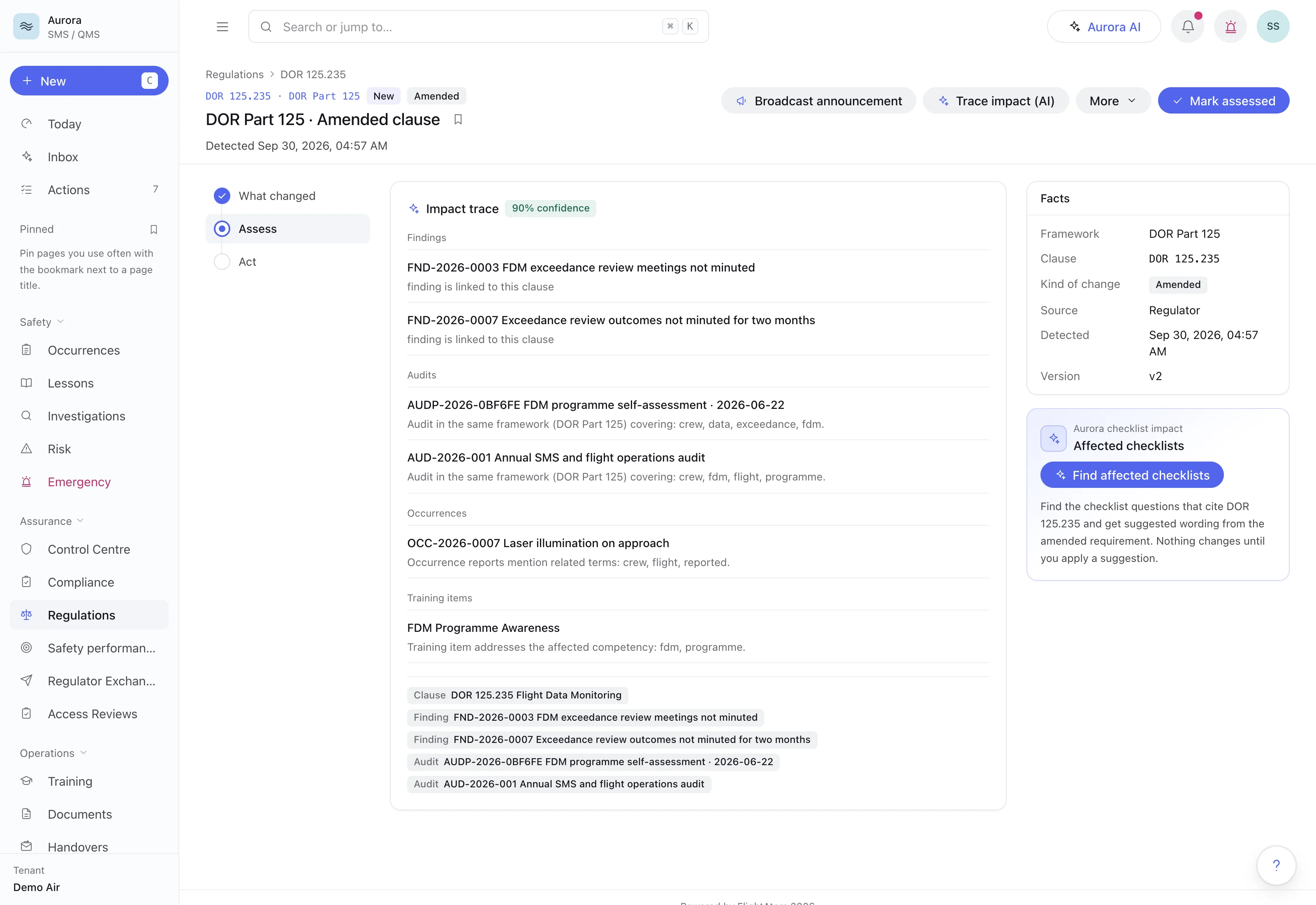
For an amended clause of a fictional demonstration rule set, the impact trace lists the linked findings and the audits, occurrence and training item it suggests, each with its reason (here a clause link and shared topics). Synthetic demonstration data.
Unstable approaches rose to 6.31 per 1000 sectors, past alert level 2 of the indicator's own baseline, so the indicator asks for action. Synthetic demonstration data.
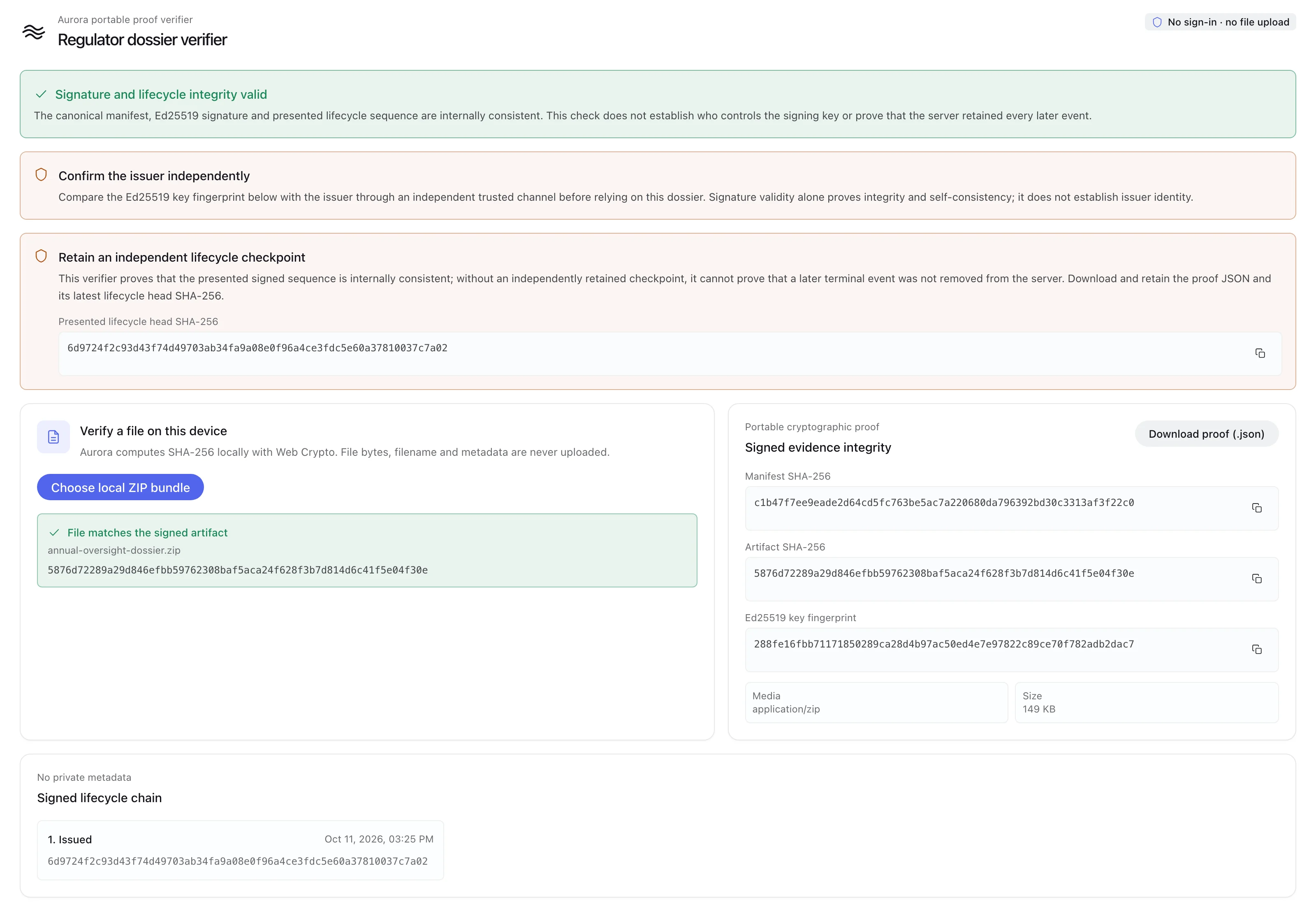
The public verifier checks a dossier's Ed25519-signed manifest and lifecycle in the browser, and a ZIP chosen on the device matches the signed artifact hash without being uploaded. Synthetic demonstration data.
Each process keeps its owner, its evidence and the approvals behind it in one standalone system.
Staff file a report as safety or security, on forms your administrators configure, from an installable app that holds a named report written offline and sends it once the connection returns. Security reports are visible only to people with security access, a report can be filed without linking it to the reporter's account, seeing who filed a named report takes a separate permission, and unfinished reports stay as private drafts.
Each report can carry an event risk classification on the ARMS matrix, from the worst credible outcome and the barriers that remained. When the safety office confirms a mandatory occurrence report, AURORA Ai tracks it against a 72-hour window from the event and records when the regulator was notified and its reference. Lessons and case dossiers can be shared de-identified, and a de-identified lesson cannot be published while identifiers remain.
A barrier whose assurance check is missing, overdue, expired or ineffective earns no credit in the live risk score, which the register shows beside the approved baseline and the planned score. AURORA Ai scores every threat-to-consequence path in a bowtie risk network, and each assessment ends in a verdict and a decision to continue, continue with conditions or stop. Accepting a risk needs a review date and every approval its policy requires, never from the requester, and is kept in an append-only ledger.
No one signs off a safety case on unverified corrective action. A case cannot reach root cause until its investigation has a summary, a finding and recorded evidence, enter corrective action without a documented root cause, or leave it until someone other than each action's owner and completer verifies it with evidence. Closure then needs an effective monitoring result with at least one recorded observation and sign-off by the Safety Manager and the Accountable Manager as two different people, neither of them the case owner or delegate.
Recurring checklists run from an audit programme calendar that flags missed runs and stale questions, a checklist item that requires evidence cannot record a result without it, and a failed item raises a linked finding. Findings are graded Level 1, Level 2 or Observation with response and closure deadlines; a deadline extension is decided by someone other than the person who asked, and a Level 1 finding cannot be closed by the person responsible for it. Outside auditors submit evidence and sign-off through a short-lived, single-use link, with no account needed.
Safety objectives are measured by indicators fed from occurrence reports, event risk classes, findings, overdue corrective actions, training currency, document acknowledgements, equipment or manual entry, as counts or rates per flight hour or sector. Alert levels sit at the baseline mean plus one, two and three standard deviations, or at fixed values, each period is marked on target or at its alert level, and monthly, quarterly and annual reports are produced as PDF.
A regulator can check, without an account, that a dossier is unchanged since the operator signed it and whether it has since been revoked or superseded. Evidence packs leave AURORA Ai as reproducible dossiers with an Ed25519-signed manifest, and the public verification page hashes the file and checks the signature in the regulator's own browser. A scoped workroom lets the regulator raise requests with the operator.
Amendments are recorded in the regulation library, and for each change AURORA Ai shows the clause before and after, suggests the findings, audits, risks, occurrences and training items it is likely to affect with a reason for each, and finds the audit checklist questions that cite the clause. One action opens a management-of-change task list from that trace. Formal changes follow a governed run from an approved template, with phase gates, named approval roles and required evidence, and the change owner cannot approve or reject their own gate.
Controlled documents carry one draft at a time, a publish gate and revision comparison, and reach the right people through audience rules by role, department, position, crew rank and fleet. Readers see what changed for them and can take a short comprehension quiz whose answers stay hidden until they pass, while late readers get reminders. AURORA Ai also flags numeric limits that conflict between published documents.
Actions from every module sit in one hub with owners, due dates, postponement requests decided by someone other than the requester, and a close-out the assigner verifies. Safety Review Board and safety action group series carry open items forward into the next agenda, invitations download as calendar files, and actions in the minutes become a tracked workflow. Emergency response plans run from an activation console with checklists, call trees, a live elapsed timer and an append-only timeline.
Readiness is computed from signed-off training, check and medical records against requirements set by rank, fleet and base, with independently approved exemptions. Checks are graded on form-based grade sheets, including competency-based grading against the nine ICAO competencies, and revalidation dates follow the operator's rules. AURORA Ai builds a prioritised recovery plan that never changes a schedule and can suspend a time-bound role assignment when a required qualification lapses.
AURORA Ai applies AI to reading and drafting: classifying reports, drafting bowties and action plans, and finding the records behind an answer. Risk scores, closure gates and approvals run on rules the application enforces.
The AURORA Ai assistant answers from your occurrences, hazards, risks and current published documents, and every citation comes from a record it retrieved, not from the model. It also classifies reports with an ADREP-inspired event code, flight phase and severity, suggests the event risk class and whether a report is mandatory, and drafts bowties, corrective action plans, safety lessons and workflows for the owner to adopt.
Today brings each person's work from every module into one queue, ordered by due date and split into their own tasks, tasks they delegated and the Assurance Inbox, which ranks work by a fixed rule weighing consequence, deadline, exposure, accountability and staleness. Above it, the Aurora brief and shift handover are assembled by rules from live records, so every item links to a source record and the model only writes the summary.
Every AI request passes through one gateway that keeps external model processing off until the operator enables it and can use an approved self-hosted model instead; without one, rules-based fallbacks run. Each call is recorded in an AI audit ledger with the model, prompt and response excerpts, confidence and user, and the operator can switch off the assistant and briefs, corrective-action and bowtie drafting, impact tracing and training advice.
Agree a representative sample and a baseline from your current process. These are proposed evaluation measures, not published performance results.
An occurrence, risk assessment, and corrective action from the same workflow.
Follow ownership, the approval record, and closure evidence.
Action preparation time; overdue actions; completeness of closure evidence.
AURORA Ai covers safety and security occurrence reporting, mandatory occurrence report tracking, event risk classification, hazard and bowtie risk assessment, risk acceptance, investigations, safety cases with gated corrective action and effectiveness monitoring, audit programmes and findings, safety performance indicators, management of change, regulatory change tracing, controlled documents, crew training readiness, actions, safety meetings, emergency response plans, and an equipment and calibration register with a 90-day due-date forecast.
AURORA Ai is a standalone SMS and QMS, so it runs as the operator's safety and quality system without another FlightAtom product or a separate core system. Historical occurrence reports can be imported from CSV: AURORA Ai suggests a column mapping for the team to confirm, flags issues row by row so they can be fixed, and skips any row that still has an error when the import loads.
AURORA Ai supports confidential reporting. Staff can submit a report without linking it to their account, and on a named report, seeing who filed it requires a separate reporter-identity permission. Security reports are visible only to people with security access. When a named report is closed, the team can publish closure feedback to the reporter inside AURORA Ai, and the reporter can acknowledge it.
Yes. The reporter can declare a report mandatory, the safety office records its decision, and AURORA Ai tracks a confirmed mandatory occurrence report against a 72-hour window from the event, showing it as pending, overdue or notified. The team records when the regulator was notified and the regulator's reference; AURORA Ai does not send the notification itself.
Yes. AURORA Ai installs from the browser as an app. A named report written without a connection is held on the device and sent once, without duplicates, when the connection returns. Report fields also accept voice dictation.
Yes. AURORA Ai builds bowtie risk networks of threats, barriers and consequences and scores every threat-to-consequence path. A barrier loses its credit when its assurance check is missing, overdue, expired or ineffective, so live exposure rises against the approved baseline. The risk register shows the baseline, current and planned scores side by side, and AURORA Ai can draft a bowtie and suggest controls from the hazard and its linked occurrences for the risk owner to review.
Yes. Safety objectives are measured by indicators fed from occurrence reports, findings, overdue corrective actions, training currency, document acknowledgements, equipment or manual entry, as counts or rates. Each indicator has a target and alert levels set at the baseline mean plus one, two and three standard deviations, or at fixed values, and monthly, quarterly and annual reports are produced as PDF.
Checklist items that require evidence cannot record a result without it, failed items raise linked findings, findings link to regulation clauses with response and closure deadlines, and outside auditors can submit evidence and sign-off through a single-use link. Safety cases keep their verification and sign-off records. Evidence packs leave AURORA Ai as reproducible dossiers with an Ed25519-signed manifest, which a regulator can check on a public verification page that hashes the file and verifies the signature in their own browser.
AURORA Ai's AI classifies reports with an ADREP-inspired event code, flight phase and severity, suggests event risk classes and mandatory reporting, drafts bowties, corrective action plans, safety lessons and workflows, summarises the Today brief and shift handover, and answers questions with citations to the operator's own records. Every request passes through one gateway, external model processing stays off until the operator enables it, and each call is recorded in an AI audit ledger.
Yes. AURORA Ai supports OpenID Connect single sign-on, SCIM 2.0 user and group provisioning, and built-in authenticator-app multi-factor authentication with step-up for sensitive actions. Time-bound role assignments can be blocked or flagged by separation-of-duties rules, certified in access reviews, and suspended automatically when a required qualification lapses.
As your fleet, routes, rules or teams change, we adapt AURORA Ai to match, and you approve each change before it goes live.
A focused walkthrough, with the people and decisions that matter to your team.