FLIGHTS · Aurora add-on

FLIGHTS airline data and performance

FLIGHTS adds operational records and post-flight performance context to Aurora. It synchronizes dispatch records, available fleet-position context, post-flight documents, and analytics while keeping source freshness and operational authority explicit.

Launch interactive demo Preview passcode · fictional FlightAtom Airways sample data
Aurora add-on

See where FLIGHTS fits around Aurora.

FLIGHTS is a connected add-on for Aurora. Add it when you need operational records and post-flight performance context; the exact data and workflow connections are configured for your operation.

Explore Aurora, the core platform →

See it in action

Interface preview with fictional sample data. Final screens, fields, and connected sources vary by operator configuration.

Operations Workspace

FlightAtom Flight Operations Overview screenshot
Operations Overview: Review synchronized flight, time, fuel, emissions, departure OTP, taxi, and fleet-use metrics in one operating picture
FlightAtom Flight Live Fleet Context screenshot
Live Fleet Context: See available provider-position context with source-dependent status, route progress, and freshness limitations
FlightAtom Flight Flight Records & OOOI screenshot
Flight Records & OOOI: Search connected flight records, review Out, Off, On, and In timestamps, and export supported data

Performance & Data Assurance

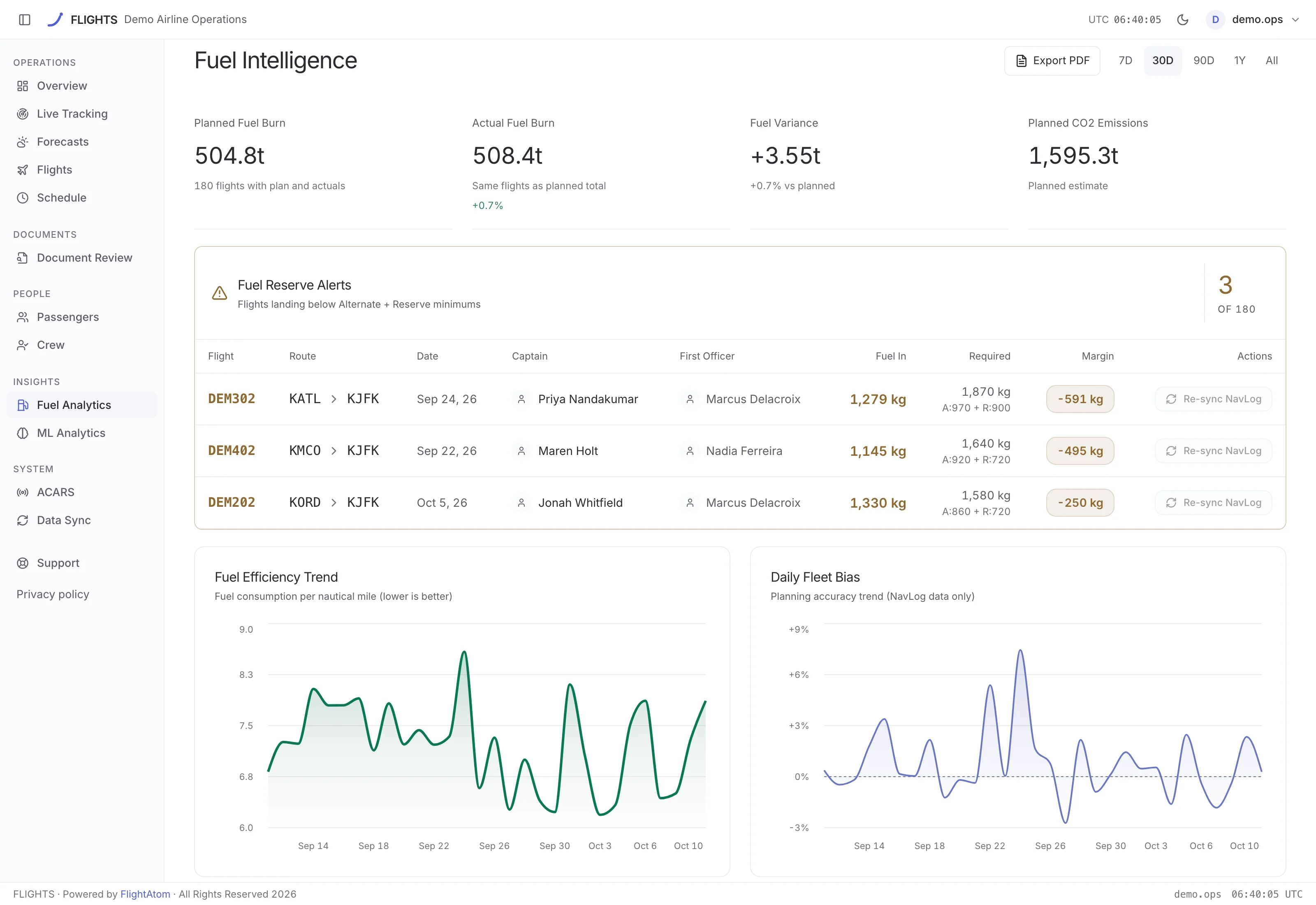
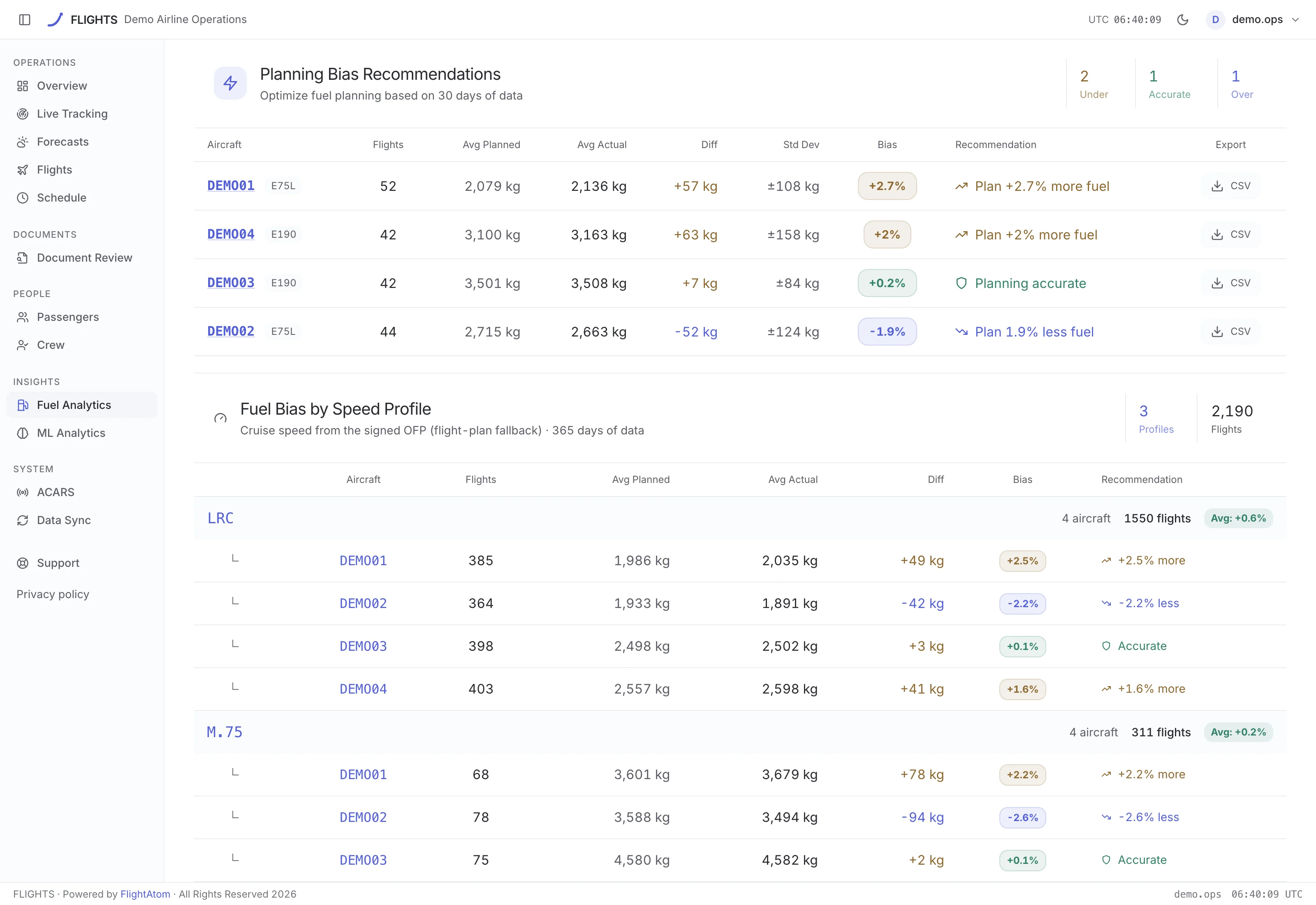
FlightAtom Flight Fuel Performance screenshot
Fuel Performance: Compare planned and actual burn, NavLog values, taxi behavior, per-aircraft results, and planning bias
FlightAtom Flight Schedule & OTP screenshot
Schedule & OTP: Review OOOI-derived schedule adherence, departure OTP, delay patterns, and block variance; arrival indicators may use an estimated baseline
FlightAtom Flight Passenger & Capacity screenshot
Passenger & Capacity: Examine passenger, cargo, load-factor, route, and operator-configured capacity trends across available data
FlightAtom Flight Crew Activity screenshot
Crew Activity: Review recorded crew activity and supported flight associations without inferring eligibility or fitness
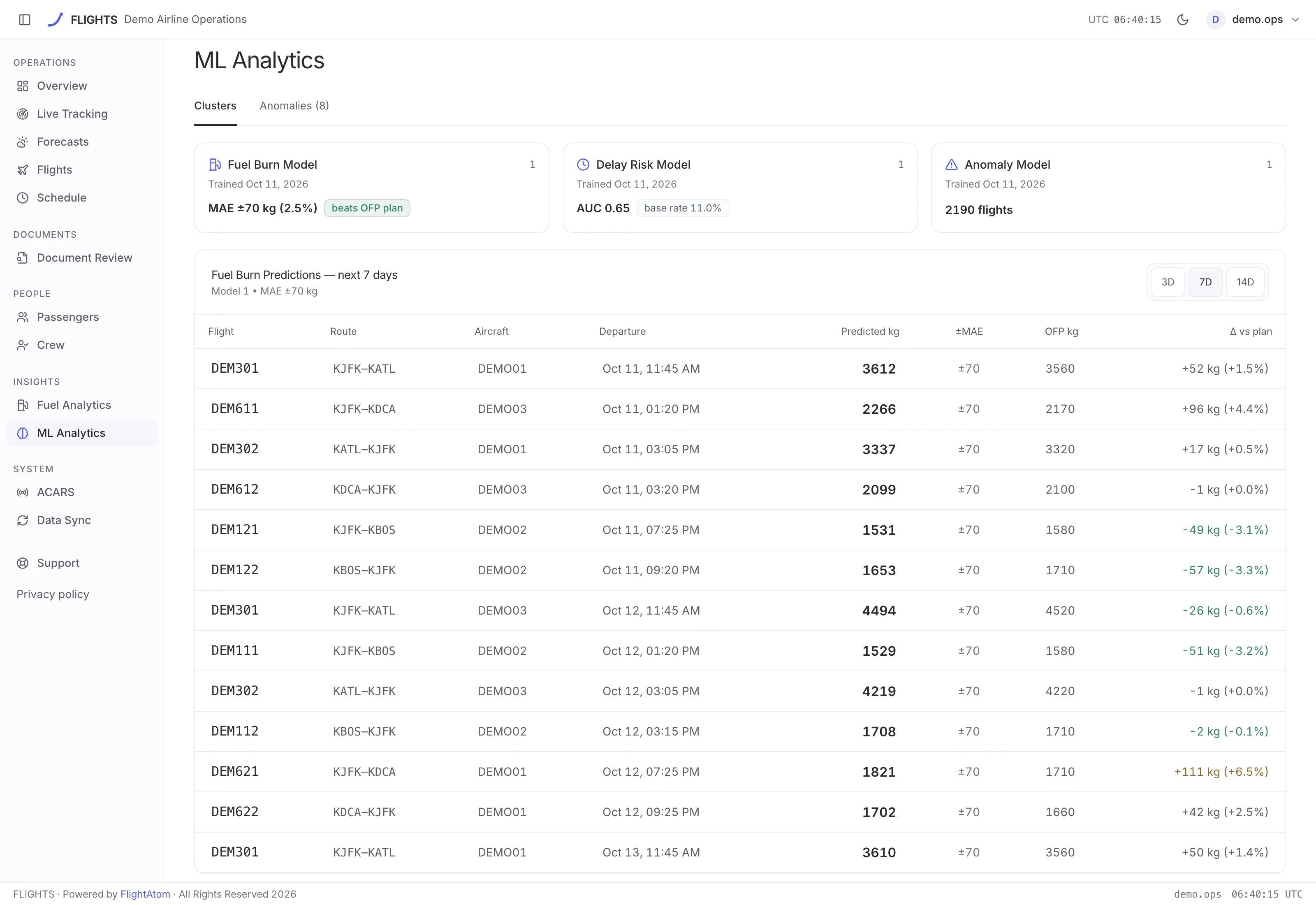
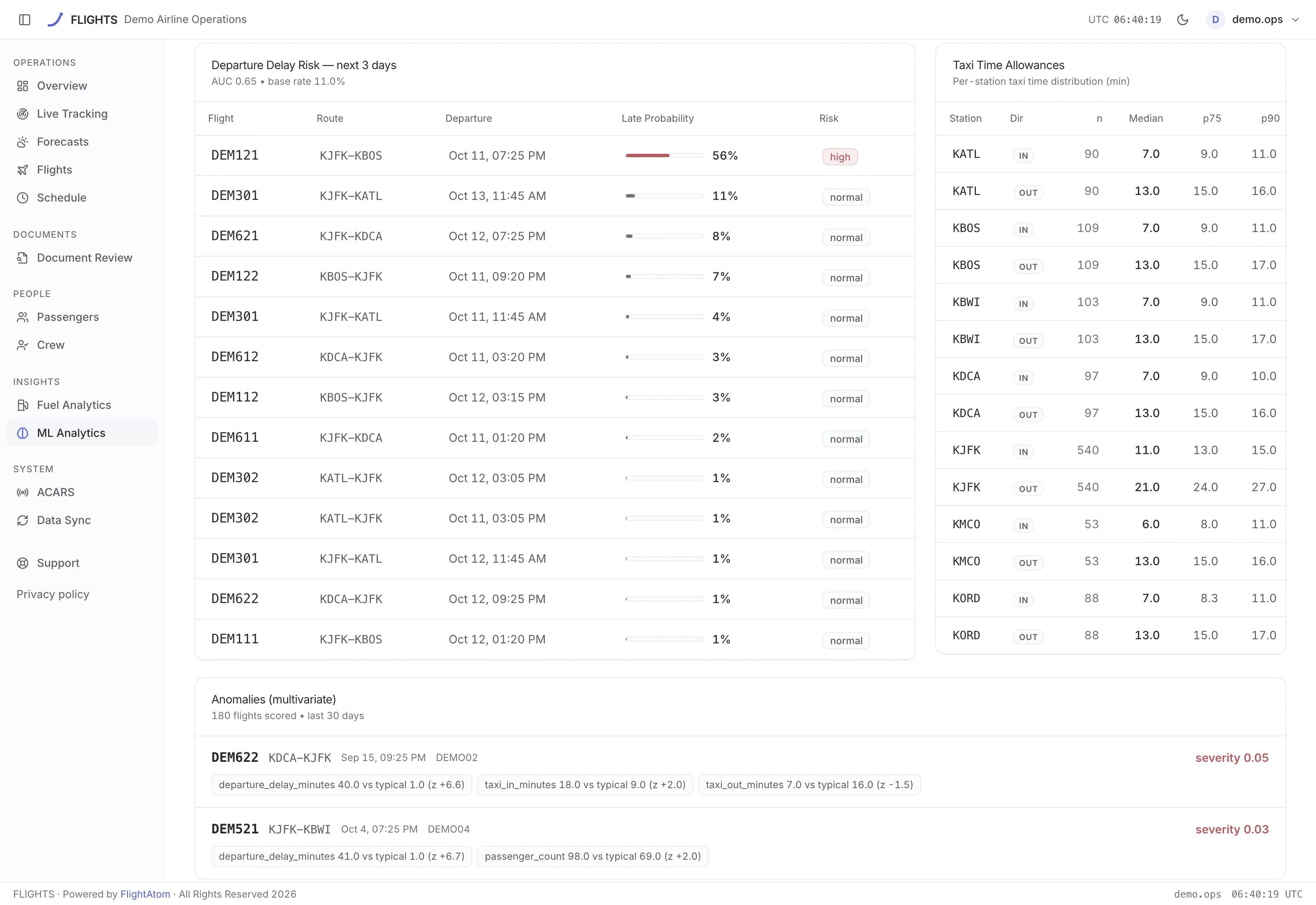
FlightAtom Flight Route & Anomaly Analytics screenshot
Route & Anomaly Analytics: Inspect explainable route clusters and anomaly indicators as prompts for human investigation
FlightAtom Flight Data Freshness & Sync screenshot
Data Freshness & Sync: Review synchronization history, comparison status, missing coverage, and source freshness before follow-up

See the product, not a promise

See the synchronized operating picture
Operations Overview

See the synchronized operating picture

Bring connected flight volume, time, fuel, emissions, departure OTP, taxi, and fleet-use metrics together while retaining the limits of each source.

Compare the plan with what was recorded
Fuel Performance

Compare the plan with what was recorded

Review planned and actual burn, NavLog values, taxi behavior, aircraft results, and planning bias after operation without turning analysis into a fuel or dispatch decision.

Close post-flight gaps with the source in view
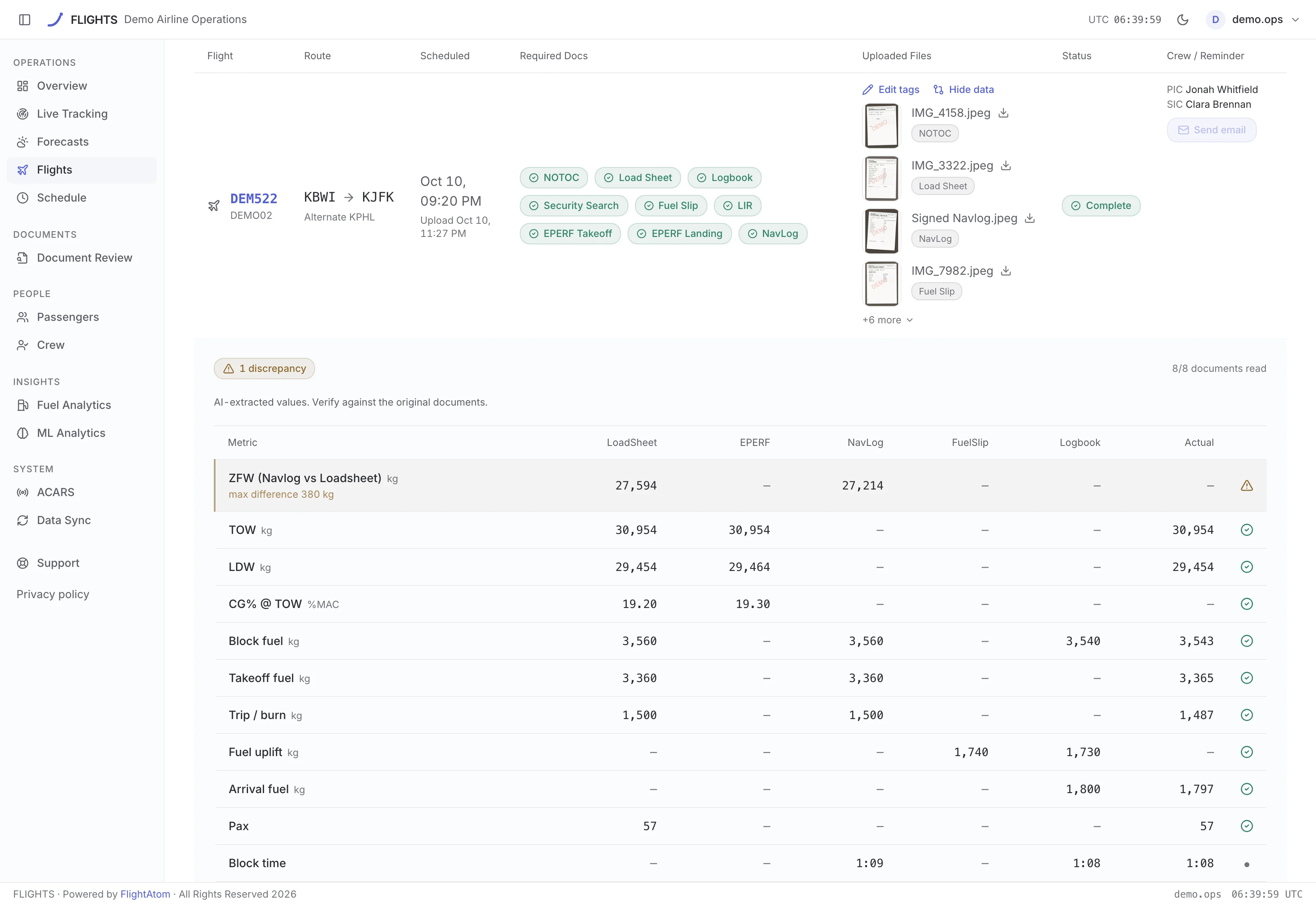
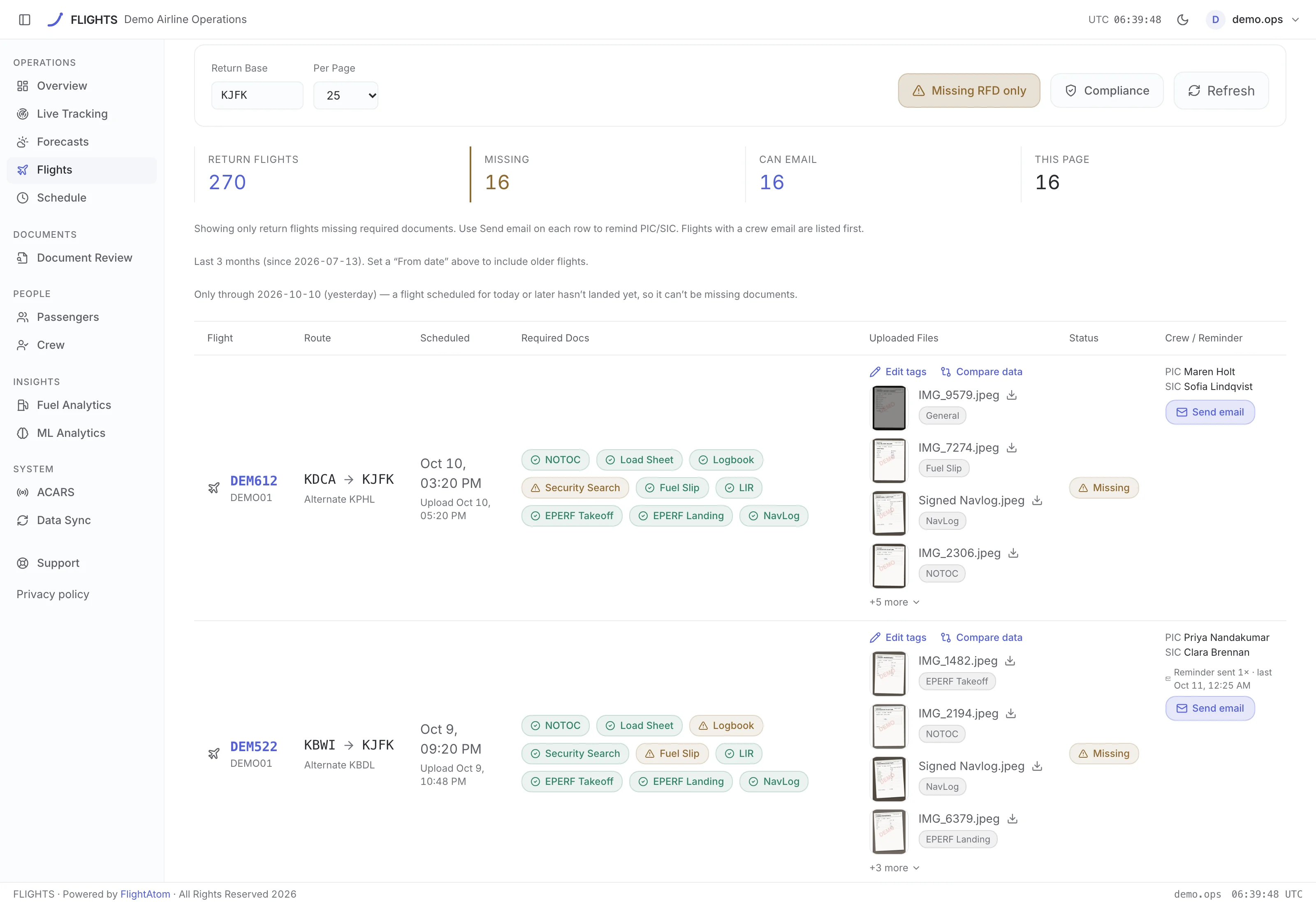
Data Assurance

Close post-flight gaps with the source in view

Inspect return-document status, comparisons, supported manual retagging, reminders, synchronization history, and data freshness before recording follow-up.

One reviewable workspace from operational activity to performance follow-up

Operations overview

Review flight volume, flight and block time, fuel, emissions, departure on-time performance, taxi time, and fleet-use metrics from synchronized records.

Available fleet context

Present provider-position context, status, route progress, and selected crew or message detail when those sources are available and current.

Flight records & OOOI

Search and export connected flight records, review Out, Off, On, and In timestamps, and compare operational trends without replacing the controlling record.

Fuel performance

Compare planned and actual burn, NavLog values, taxi behavior, per-aircraft results, and planning bias using the data available after operation.

Schedule, configured capacity & crew activity

Examine OOOI-derived schedule adherence, departure OTP, estimated arrival indicators, passenger and cargo volume, operator-configured capacity context, route patterns, and recorded crew activity. Arrival views may use a derived baseline rather than an official schedule measure.

Post-flight data assurance

Review return-document status, manually retag supported files, send reminders, compare imported data, and inspect synchronization history and freshness.

Signals that show their source and their limits

FLIGHTS helps teams compare connected operational records without hiding source freshness, incomplete coverage, or the difference between an analytic indicator and an authorized operational decision.

Freshness & coverage

Know when synchronized flight data last moved

Flight-sync history, comparison views, and overall freshness status help teams distinguish current records from delayed, incomplete, or unavailable coverage. Post-flight artifacts can arrive later; NavLog PDFs may take 24 to 48 hours to become available.

Explainable indicators

Inspect patterns without treating them as findings

Configured route clusters, anomaly indicators, and backtested predictions can focus performance review. They do not establish causation, guarantee a result, or authorize an operational response.

Human review

Keep ambiguous data out of automatic conclusions

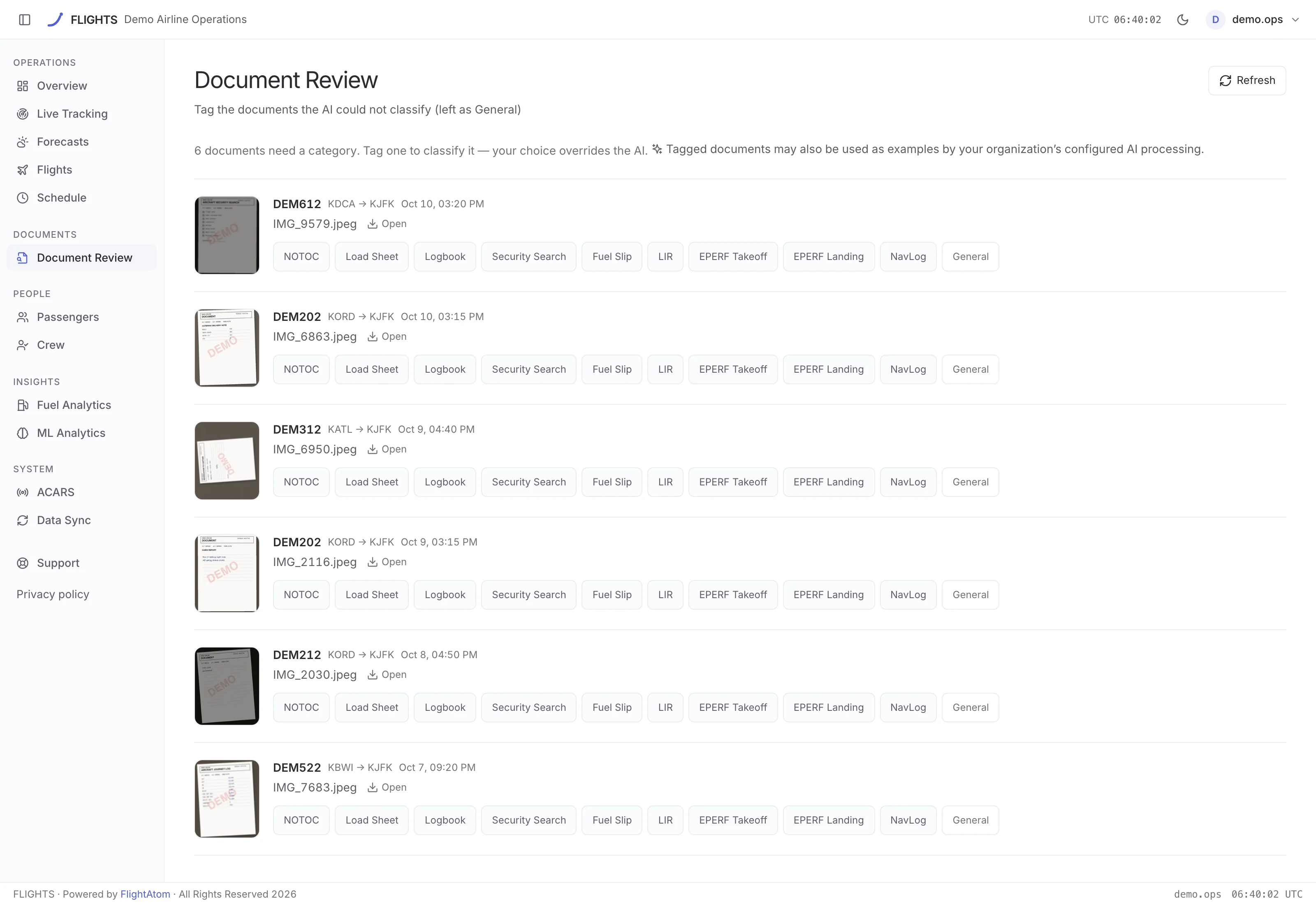
Optional AI extraction can omit uncertain fields for manual review. Teams can compare values, retag supported documents, and investigate discrepancies while the source record and accountable process remain authoritative.

Operational boundary

FLIGHTS is decision-support and performance software. It does not replace a dispatch release, operational flight plan, EFB, approved weather source, ACARS, operational-control system, regulatory record, or required human review. Provider positions may be delayed, estimated, stale, or unavailable; weather coverage can be incomplete; low-fuel views are retrospective; and analytic or machine-learning indicators do not guarantee operational outcomes.

A clearer path from synchronized record to reviewed follow-up

Start with the operational data the airline already controls, make freshness visible, and keep performance review separate from dispatch release and other regulated operational decisions.

1. Synchronize selected sources

Connect the supported dispatch, flight, fuel, schedule, passenger, crew, document, and provider-position data included in the operator's rollout.

  • Synchronize configured data from the ForeFlight Dispatch API where available
  • Retain source identity, comparison status, and synchronization history
  • Make delayed, missing, or incomplete coverage visible

2. Review activity and performance

Move from the operations overview into the flight, fuel, schedule, configured capacity, crew, route, and anomaly context relevant to the review.

  • Compare planned and actual values after operation
  • Inspect OOOI, departure OTP, derived arrival, taxi, NavLog, and planning-bias context
  • Treat analytic and ML indicators as prompts for investigation

3. Resolve post-flight gaps

Investigate missing or mismatched return documentation and imported values, then record the supported review action without rewriting the source of truth.

  • Review return-document status and comparisons
  • Manually retag supported files and send reminders
  • Recheck synchronization freshness before recording follow-up

What does FlightAtom FLIGHTS bring together?

FLIGHTS connects synchronized flight records, OOOI timestamps, available fleet-position context, post-flight documentation, fuel and schedule performance, passenger data and operator-configured capacity context, crew activity, and data-freshness history in web and iOS workspaces. Available coverage depends on the operator's connected sources.

How does FLIGHTS use data from ForeFlight?

Where configured by the operator, FLIGHTS synchronizes selected operational data from the ForeFlight Dispatch API for review and comparison. Availability, scope, latency, and source authority depend on the integration. FlightAtom is not endorsed by ForeFlight.

Are the live fleet and weather views approved operational sources?

No. Provider positions can be delayed, stale, estimated, or unavailable, and weather coverage can be incomplete. These views support awareness and analysis only; crews and operational teams must use approved systems, weather products, procedures, and communications for decisions.

What can teams review after a flight?

Depending on connected data, teams can review flight and OOOI records, planned-versus-actual fuel, NavLog and taxi context, planning bias, schedule adherence, passenger trends and operator-configured capacity context, crew activity, return-document status, and synchronization history.

How does FLIGHTS use machine learning and AI?

FLIGHTS can present explainable route clusters, anomaly indicators, and backtested predictions where configured. Optional AI extraction may omit ambiguous fields for human review. These indicators do not guarantee outcomes, establish causation, or make operational decisions.

Does FLIGHTS replace dispatch release or regulated records?

No. FLIGHTS is a decision-support and performance workspace. It does not replace an operational flight plan, dispatch release, EFB, approved weather source, ACARS, operational-control system, regulatory record, or required human review. Post-flight artifacts can arrive later; NavLog PDFs may take 24 to 48 hours to become available.

See FLIGHTS connected to Aurora

We will show the core platform first, then the flight-record and performance workflow and the handoffs relevant to your operation.

Request an Aurora + FLIGHTS demo