01 / CREW Ai
Flight and cabin crew on one roster
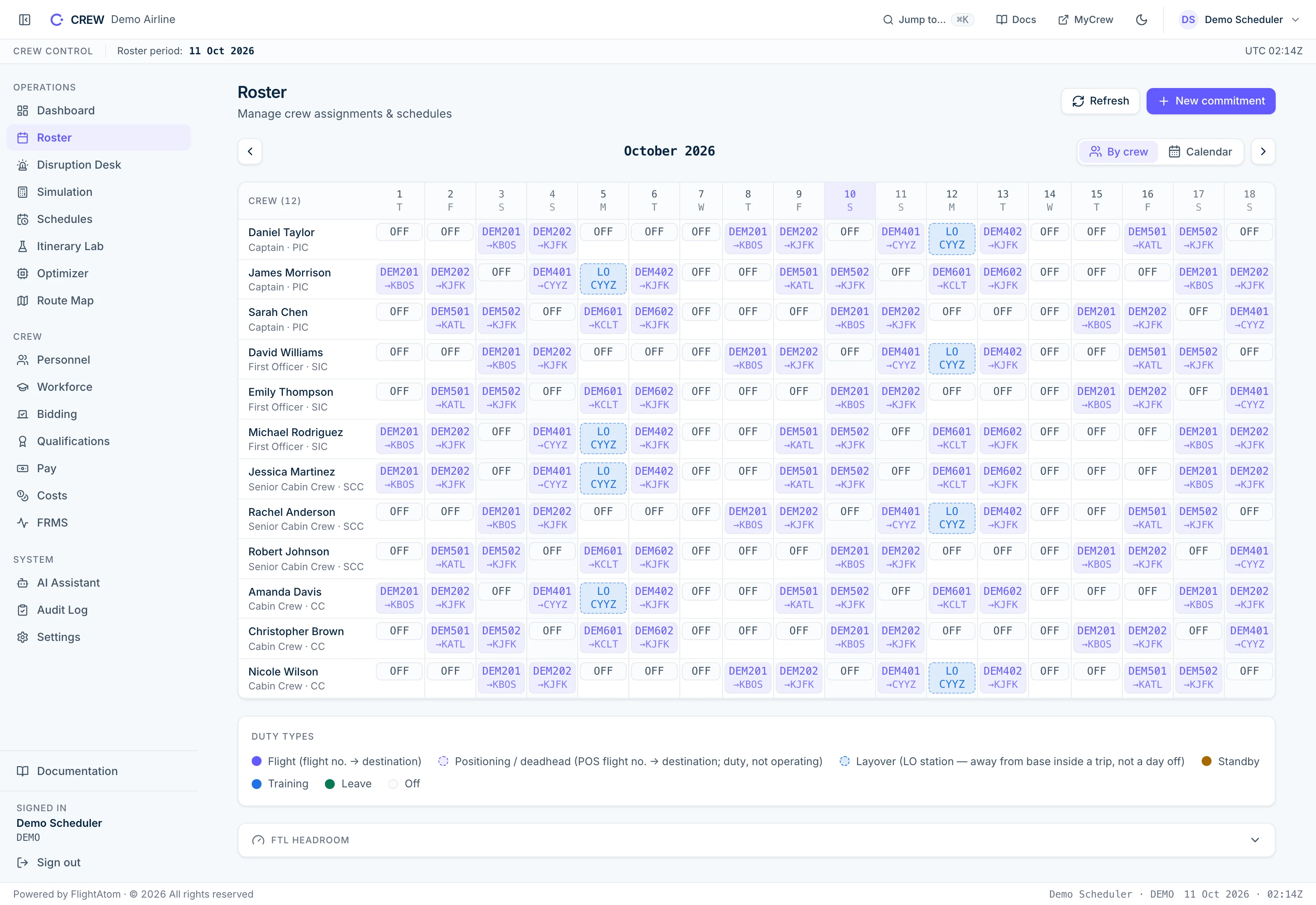
Captains, first officers, senior cabin crew and cabin crew share one monthly roster grid, with each day's flight, layover or day off. Synthetic demonstration data.
CREW Ai is an airline crew management system for building flight and cabin crew rosters within flight-time limitations, working out how many crew a season needs and comparing ranked recovery options when a disruption hits. A constraint solver builds each roster, and one flight-time engine checks every duty. Rosters go live only with every seat covered by qualified crew and a named administrator's sign-off, and recovery waits for a duty manager's approval.
Email me the brochure, CREW AiCREW Ai is FlightAtom's airline crew management system for flight and cabin crew. A constraint solver builds rosters, a flight-time limitation engine for FAA Part 117, EASA Subpart FTL and the OTAR scheme checks every duty, and a roster is published only when seat coverage, qualification currency and a named approver's sign-off all pass. Duty managers approve disruption recovery options, and administrators can query the operation through an AI assistant or their own AI client.
A new period needs a roster, and the day of operation will change it. One flight-time engine judges the roster the solver builds, the version that is published and every recovery option.
A constraint solver assigns crew to every sector, replays each candidate through the flight-time engine against real duty history, and reports whether each stage was proved optimal.
The roster goes live only when every seat is covered, every assignee holds current qualifications and a named administrator signs off. Otherwise the previous roster stays live.
A cancellation, retime or sick call opens a disruption. The recovery solver locks every unaffected duty and ranks options that pass the rules, each explained in plain English with a draft crew message, and the duty manager approves one.
A published roster and an applied recovery, each re-checked against the flight-time rules and kept with its approval in the revision ledger.
A named administrator signs off publication, and the duty manager chooses the recovery option. The roster changes only when they approve.
One flight-time limitation engine sits at the centre of CREW Ai. The roster solver, the publish check, recovery, hand-entered standby and crew-demand simulation all take their legality verdict from it.
Explore the current product interface with demonstration data. Open any screenshot for a closer look.
Captains, first officers, senior cabin crew and cabin crew share one monthly roster grid, with each day's flight, layover or day off. Synthetic demonstration data.
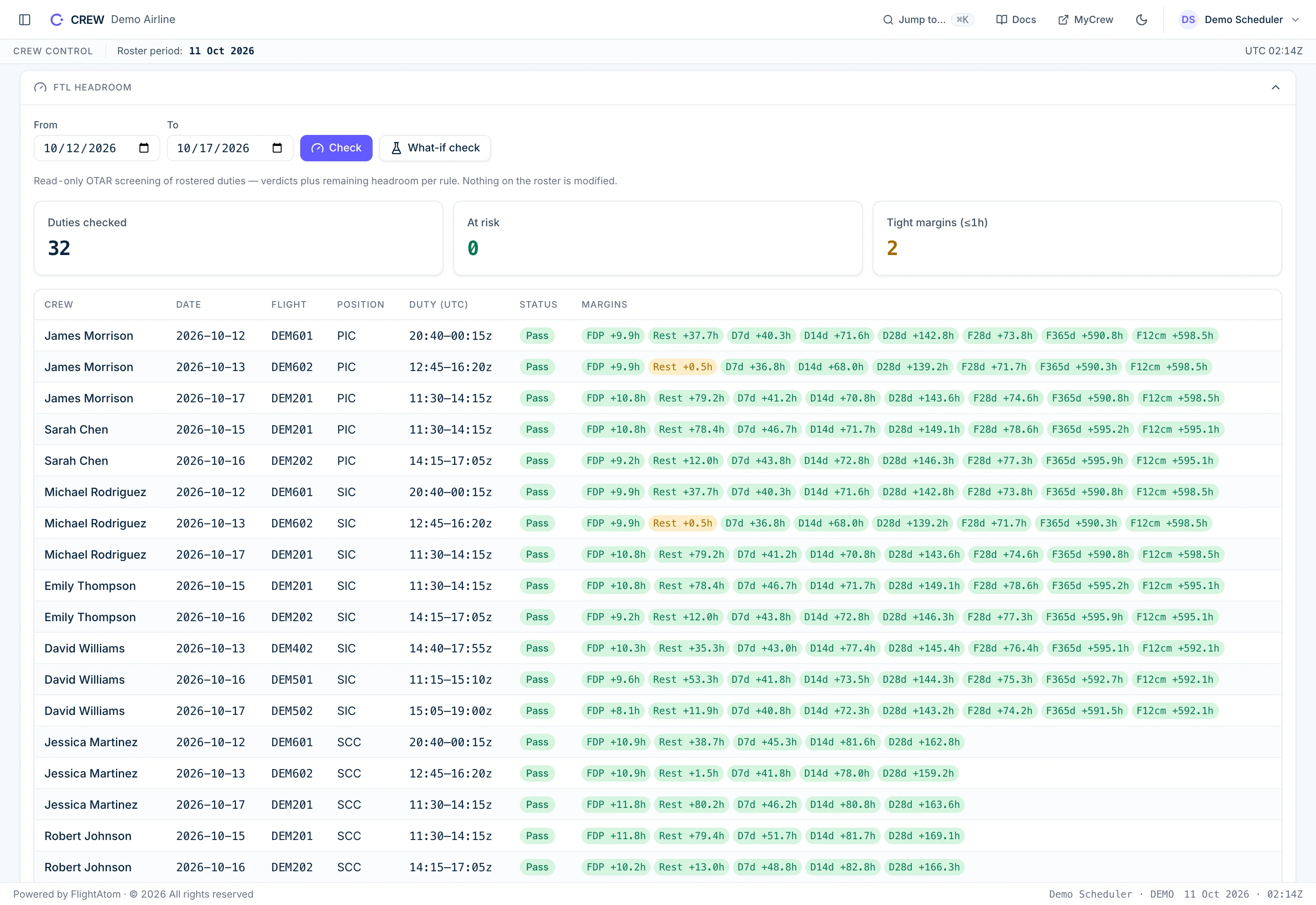
A read-only check of the rostered duties from 12 to 17 October shows each duty's remaining margin on FDP, rest and the cumulative duty limits, plus flight-time limits for flight crew, and highlights the two tight rest margins. Synthetic demonstration data.
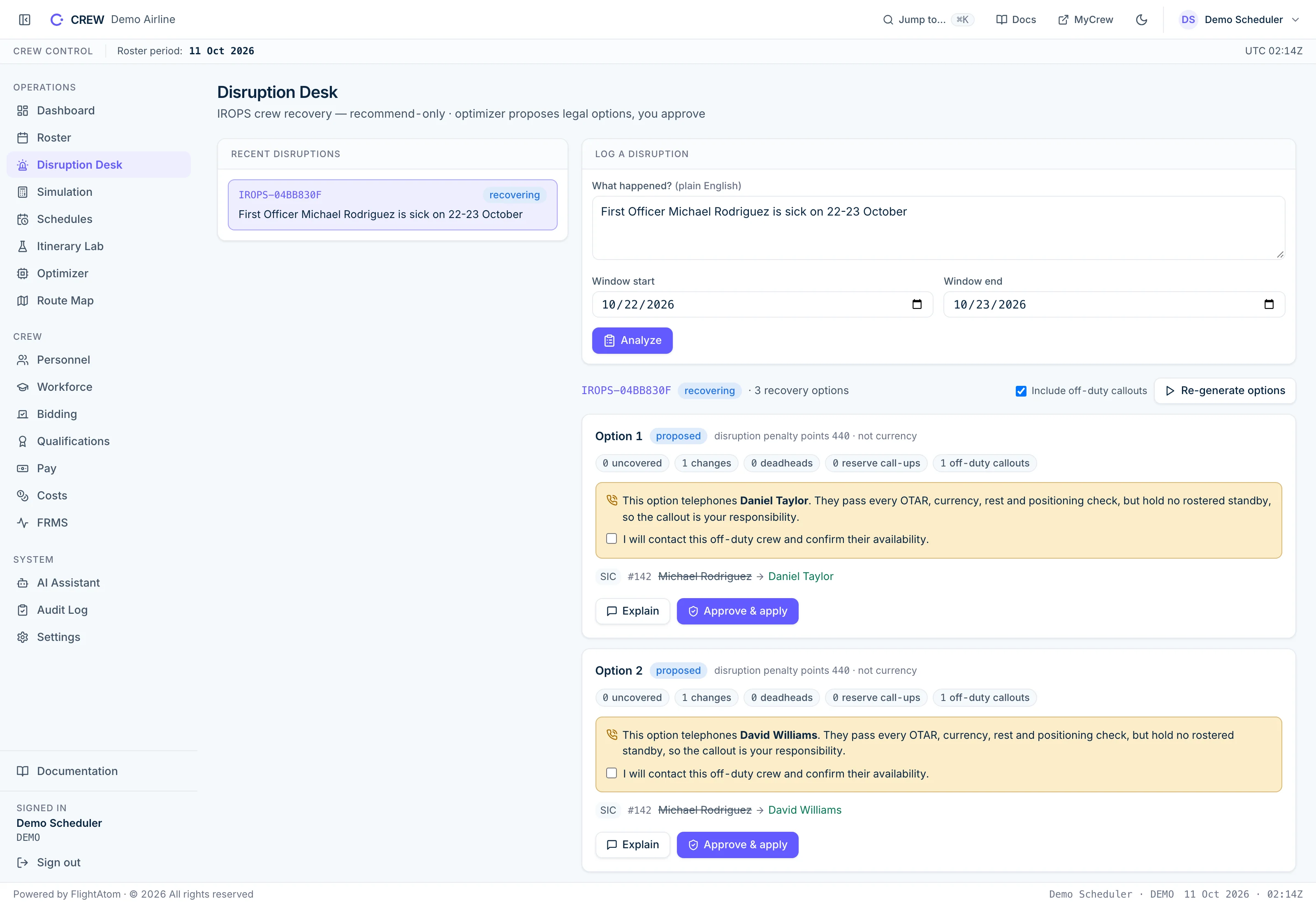
A first officer's sick call for 22 and 23 October is logged on the Disruption Desk, and recovery proposes ranked options that change only the affected seat. Options 1 and 2 each name the off-duty crew member they would call and cannot be approved until the duty manager acknowledges the callout. Synthetic demonstration data.
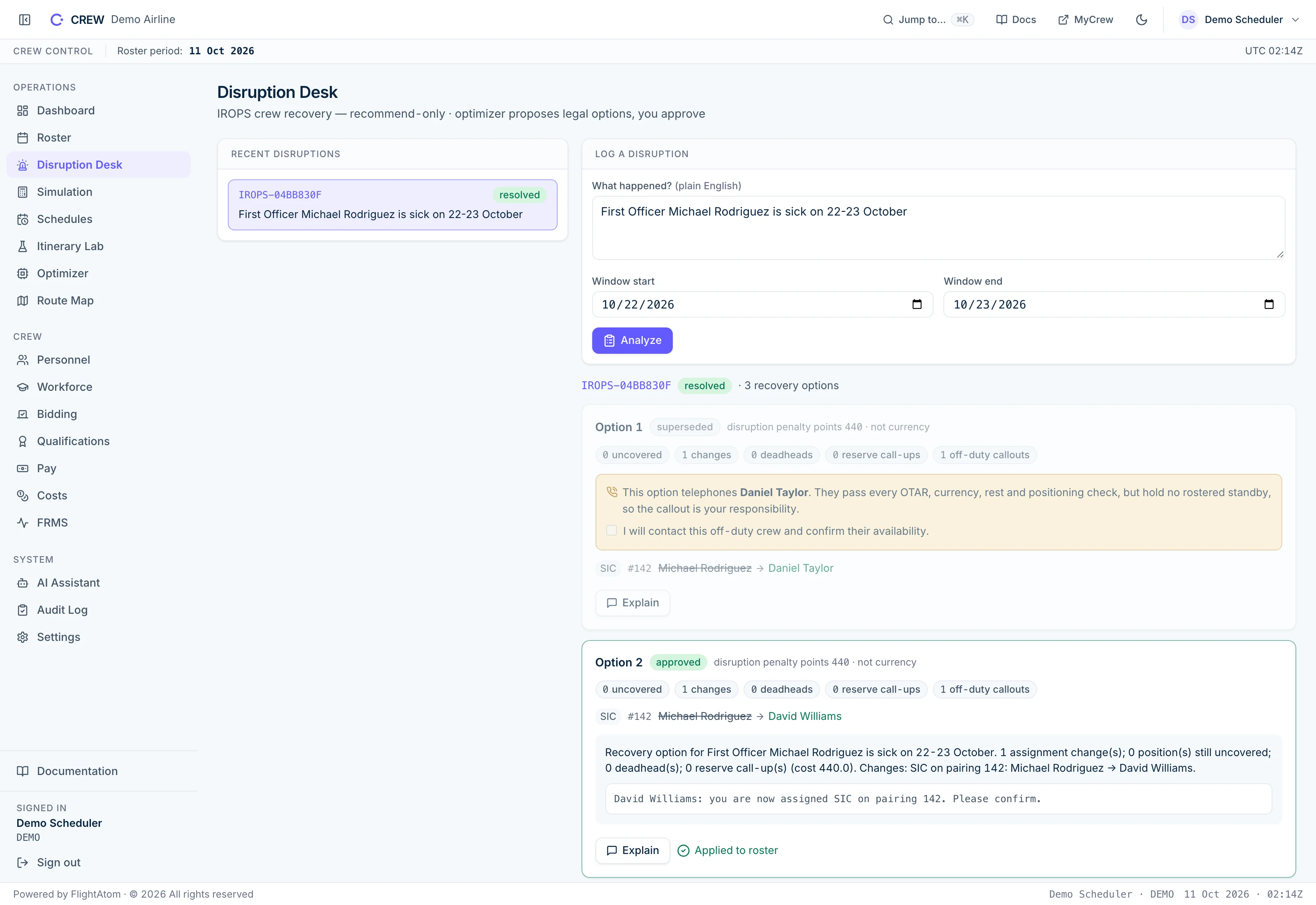
The duty manager ticked the callout acknowledgement and approved option 2, so David Williams takes the first officer seat and the other options are superseded. Explain then gives a template summary and a suggested message for the crew member. Synthetic demonstration data.
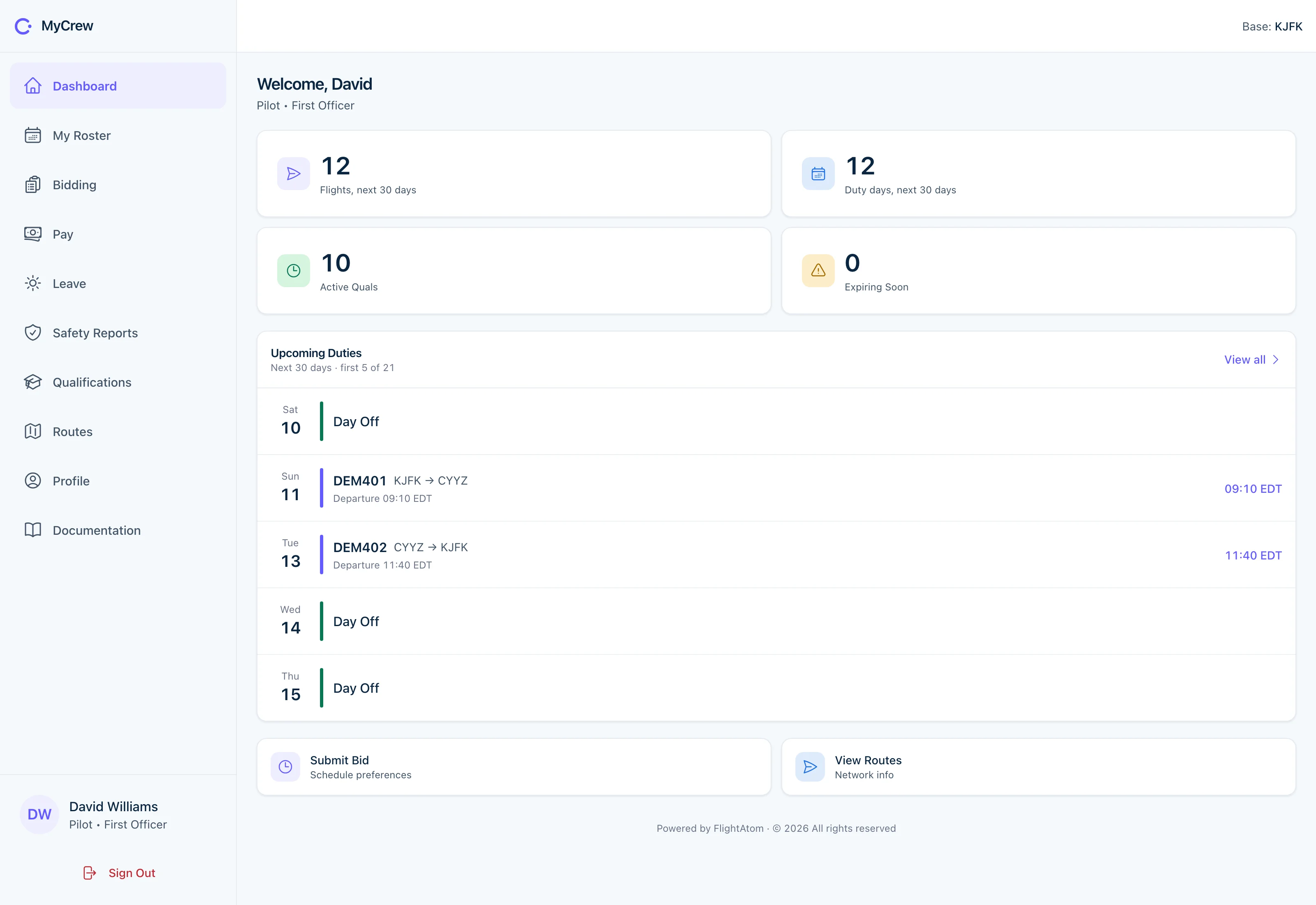
In the MyCrew portal a first officer sees flights and duty days for the next 30 days, qualification status and upcoming duties with local departure times, with links to bidding, pay, leave and safety reports. Synthetic demonstration data.
Every roster decision takes its legality verdict from the same flight-time engine, so what planners build, publish and repair, and the duty records auditors receive, are judged against one set of rules.
A constraint solver assigns flight and cabin crew to individual sectors, so duties take shape inside the solve instead of in a separate pairing step. Every candidate roster is replayed through the flight-time engine against each crew member's real duty history, and any illegal duty is cut before the search goes on. Seat coverage is settled before workload balance and roster stability, day-off bids are honoured as hard constraints, and each stage reports whether its result was proved optimal.
A crew member's sick report, or a schedule-feed cancellation or retime of a crewed flight, opens a disruption on the Disruption Desk by itself. The recovery solver keeps every unaffected assignment locked, ranks options that pass the flight-time checks, including positioning and off-duty callouts, and shows which check ruled crew out of any seat it cannot fill. Nothing changes until a duty manager approves an option and confirms any off-duty callout, and CREW Ai re-validates the option before it applies.
A roster is published only when one check passes in full: every seat filled, including a senior cabin crew member wherever cabin crew fly; every duty accepted by the flight-time engine; every assignee current on licence, medical, type and route qualifications; approved leave, planned training and manual duties respected; each crew member already at the station where the duty starts; confirmed crew records for every flight in the 84 days before the period; and source feeds fresh. A named administrator signs off, and if anything fails the previous roster stays live unchanged.
Planners re-check the live roster or test a hypothetical duty at any time and see each duty's remaining margin on flight duty period, rest and cumulative limits, with the rule named for any breach. A single engine applies FAA Part 117, EASA Subpart FTL and Appendix F to OTAR Parts 121 and 135, covering flight duty periods, rest, standby, split duty, in-flight relief, days off and cumulative limits. The optimizer, publication, recovery, hand-entered standby, duty records and simulation all take their final verdict from it.
Workforce planners size the crew establishment for the live schedule, a draft version or a copy retimed in the Itinerary Lab, and every modelled roster is replayed through the flight-time engine and costed at the operator's own salary, hotel, per diem and positioning rates. Minimum-crew search looks for the fewest legal roster lines, and season planning turns monthly lines into individual crew to give hiring numbers with and without reserve. Monte Carlo analysis shows how often a reserve level still leaves a flight uncovered, and the smallest extra standby per day that reaches a chosen service level.
In the crew self-service portal and the CREW Mobile app for iPhone and iPad, crew see their roster and standby, acknowledge the roster and each change, bid for days off and trips, request leave, and view pay, qualifications and routes. Reporting unavailable opens a disruption on the Disruption Desk straight away. Planners get recovery approval, publish review, simulation and workforce tools in CREW Admin on iPhone and iPad and in CREW for Mac.
Crew file fatigue reports and commander's discretion records from the portal or the app, and discretion is kept as evidence that never relaxes a limit. For fatigue risk management, a published sleepiness model (McCauley et al.) screens rostered duties at group level from the rest the roster allows, and elevated results are flagged for qualified human review.
Schedule, roster, recovery, qualification and sign-off changes are written to an append-only ledger, chained with SHA-256 and protected from edits by the database. Administrators pull per-crew duty and flight-time records, with each duty's limit, margin, rest and rolling totals, and revision packs that can be verified offline, through the API as CSV or JSON.
A versioned pay and credit engine calculates block-or-better credit, duty and trip rigs, reserve and positioning credit, monthly guarantees, overtime and per diem with decimal arithmetic, so a period reprices to the same cent every time. It reads the published roster and never changes it.
Language models help where planners lose time: finding facts across the operation, writing up a disruption and explaining a plan. Rosters and recovery options come from the constraint solver and the flight-time engine, and nothing an AI client requests skips the checks or sign-off a planner would face.
Administrators ask about rosters, schedules, disruptions or legality, and the assistant answers by calling read-only CREW tools, listing each one it consulted. Ask who could cover a seat and it runs the checks recovery uses, then says why every other crew member is ruled out. Crew names and identifiers are replaced with aliases before anything reaches the model provider.
A duty manager can describe a disruption in plain English and get a structured entry to edit and confirm, then ask for any solver plan to be explained with a draft message to crew. Sick calls and simulation requests typed into chat are recognised by rules, not the model, and become proposal cards that do nothing until a person confirms them.
A built-in Model Context Protocol (MCP) server lets administrators connect an AI client such as Claude over OAuth to read rosters and schedules, run simulations and check legality. Publishing or applying a recovery needs a write scope an administrator explicitly grants, and runs through the same checks and sign-off. Crew appear by the operator's crew code rather than by name.
Agree a representative sample and a baseline from your current process. These are proposed evaluation measures, not published performance results.
A representative roster, current constraints, and a disruption scenario.
Compare proposals with the existing roster and run operational validation.
Planning time and solver runtime; uncovered duties; constraint violations; roster cost.
CREW Ai covers schedules and draft timetables, rostering and bidding, flight-time limitation checks, qualification currency, leave and training planning, roster publication with sign-off, disruption recovery, fatigue reporting, crew-demand and season planning with crew cost, pay and credit, and duty records for audit. Planners work in the operations console and the CREW Admin apps, and crew use the self-service portal and the CREW Mobile app for their roster, bids, leave, pay and reports.
A constraint solver builds the roster and replays every candidate through a flight-time limitation engine for FAA Part 117, EASA Subpart FTL and OTAR Appendix F, using each crew member's real duty history, and cuts any illegal duty before searching on. Before publication, one all-or-nothing check confirms seat coverage, qualification currency, leave and training, crew location, prior crew history and feed freshness, and a named administrator signs off. If any check fails, the previous roster stays live.
The crew member reports unavailability in the portal or app, which opens a disruption on the Disruption Desk automatically. The recovery solver keeps every unaffected assignment locked and ranks options that pass the flight-time checks, including positioning and off-duty callouts where allowed. A duty manager reviews the options and approves one, and CREW Ai re-validates it before applying it to the roster.
Yes. CREW Ai can import the crew roster held in the connected flight-operations system as a mirror period and check every duty against the flight-time rules, so the Disruption Desk, recovery and compliance reports work on periods CREW Ai did not publish. Schedules arrive from the flight-operations feed, by CSV upload or as seasonal IATA SSIM files, and qualification validities sync from the training-records system.
Yes. Crew-demand simulation sizes the establishment for a live or draft schedule with a choice of eight construction methods, and every modelled roster is replayed through the flight-time engine. Minimum-crew search looks for the fewest legal roster lines, season planning chains monthly lines into individual crew to give hiring numbers with and without reserve, and workforce planning shows how many leave slots each day can grant without breaking coverage.
Yes. Crew request leave in the portal or app, and administrators approve it and plan recurrent, type-rating, captain-upgrade, line and new-hire training. CREW Ai refuses a training event that clashes with the trainee's or instructor's approved leave, other training or hand-entered roster entries. The roster solver treats approved leave and planned training as fixed days off, and workforce planning projects crew supply against demand month by month.
Yes. A versioned pay and credit engine calculates block-or-better credit, duty and trip rigs, reserve and positioning credit, monthly guarantees, overtime and per diem from the published roster. It uses decimal arithmetic with a single rounding step, so a period reprices to the same cent every time.
Administrators export per-crew duty and flight-time records through CREW Ai's API as CSV or JSON, with each duty's flight duty period against its limit, the rest before it, rolling totals and any violation. Schedule, roster, recovery, qualification and sign-off changes sit in an append-only, SHA-256 hash-chained ledger that the database protects from edits, and revision packs can be verified offline.
Yes. A built-in Model Context Protocol (MCP) server lets administrators connect an AI client such as Claude over OAuth to read rosters and schedules, run simulations and check legality. Publishing a roster or applying a recovery needs a write scope an administrator explicitly grants, and passes the same checks and sign-off as a planner. CREW Ai's own in-app assistant can only read and simulate, so it cannot change the roster.
As your fleet, routes, rules or teams change, we adapt CREW Ai to match, and you approve each change before it goes live.
A focused walkthrough, with the people and decisions that matter to your team.