XENIA Ai · AI travel concierge for airlines Plan the trip in conversation. Book only what your schedule flies.

XENIA Ai, an AI travel concierge for your airline's website, plans trips with travellers, from things to do and where to stay to a day-by-day itinerary, and opens your booking engine with the route, dates and party filled in. Code, not the AI, checks travel dates against your schedule and offers the next days you fly, and checks each reply for prices, other airlines and unsupported route claims before anyone sees it.

Email me the brochure, XENIA Ai
Airline commercial, digital and customer experience teams, and the agents who take over traveller conversationsPreviewFits your operation as it changes
XENIA Ai chat for a fictional Demo Airline: a traveller asks to book two people from New York to Lisbon on Wednesday 11 November, back on Monday 23 November; XENIA Ai replies that New York to Lisbon does not fly on Wednesday 11 November, because that direction operates only on Tuesdays, Thursdays and Saturdays, and that the Monday return does fly; the traveller answers Departing Thu 12 Nov 2026; XENIA Ai confirms and a blue Book this flight button reads JFK to LIS, 12 Nov 2026 to 23 Nov 2026, 2 adults, with a note that the booking site shows live fares; with synthetic demonstration data
Book buttons built from the scheduleDemonstration data · Click to enlarge
In brief

What is XENIA Ai?

XENIA Ai is FlightAtom's AI travel concierge for airline websites, available as a preview. It plans trips with travellers in a chat widget, answers route and timing questions from the airline's network schedule, and opens the booking engine prefilled with dates the schedule confirms. Deterministic code checks each reply before it is shown and rewrites or withholds replies that quote a price, name another airline or claim a route the schedule does not support.

Category
AI travel concierge for airlines
Built for
Airline commercial, digital and customer experience teams, and the agents who take over traveller conversations
Applied AI
Generative AI plans the trip; schedule checks, booking links and reply guardrails run as deterministic code
Availability
Preview · independent product
Fits your operation
As your operation grows or changes, we adapt XENIA Ai to fit, and you approve each change before it goes live.
How it works · XENIA Ai

The model plans, code checks, and people decide.

XENIA Ai's model writes the conversation and the trip plan, while code supplies the schedule facts, builds the Book button and checks every reply before it is shown. Travellers choose each next step, and airline editors release schedule and prompt changes.

Planned by generative AI
  • Plans the tripThe model suggests things to do, where to eat and stay, and day-by-day itineraries around the traveller's interests and travel month.
  • Calls fixed tools for factsAnswers that depend on the schedule, knowledge base, weather, a booking, an enquiry or a person go through server-validated tools.
Checked and built by code
  • Schedule from the registryWhere and when the airline flies comes only from a direction-aware registry; a day the timetable contradicts is never offered for booking.
  • Book button built by codeCode checks both dates against each direction's operating days, the schedule's effective dates, a 330-day booking window and a 60-day maximum trip.
  • Next flying days offeredWhen a date cannot be booked, code offers the next days that direction actually flies as one-tap alternatives.
  • Each reply checked before displayA draft the check flags for a price, another airline's name or an unsupported route claim is rewritten once, otherwise replaced by a safe answer.
Decided by the traveller
  • Books in the airline's engineThe Book button opens the airline's booking engine with route, dates and party filled in, where current fares are shown.
  • Confirms a live handoffThe transfer to an on-duty agent happens only after the traveller presses confirm, and the agent receives a summary, not the transcript.
  • Sends a consented enquiryGroup enquiries use a separate form with a consent box, so contact details never pass through the AI.
Released by airline editors
  • Approves schedule changesA deterministic importer shows routes added or removed, new airports and contradictions, and publishes only after an editor approves.
  • Activates prompt versionsA draft can be run against fixed safety probes scored by the same reply check, and versions stay audited and reversible.
The layers behind each XENIA Ai reply, from what the model writes to what the traveller and the airline's console editors decide.
Inside XENIA Ai

See a trip take shape.

Current XENIA Ai screens with neutral demonstration content and no customer branding. The traveller conversations were scripted for the demonstration; the checks, buttons and console are the product's own. Open a screenshot for a closer look.

01 / XENIA Ai

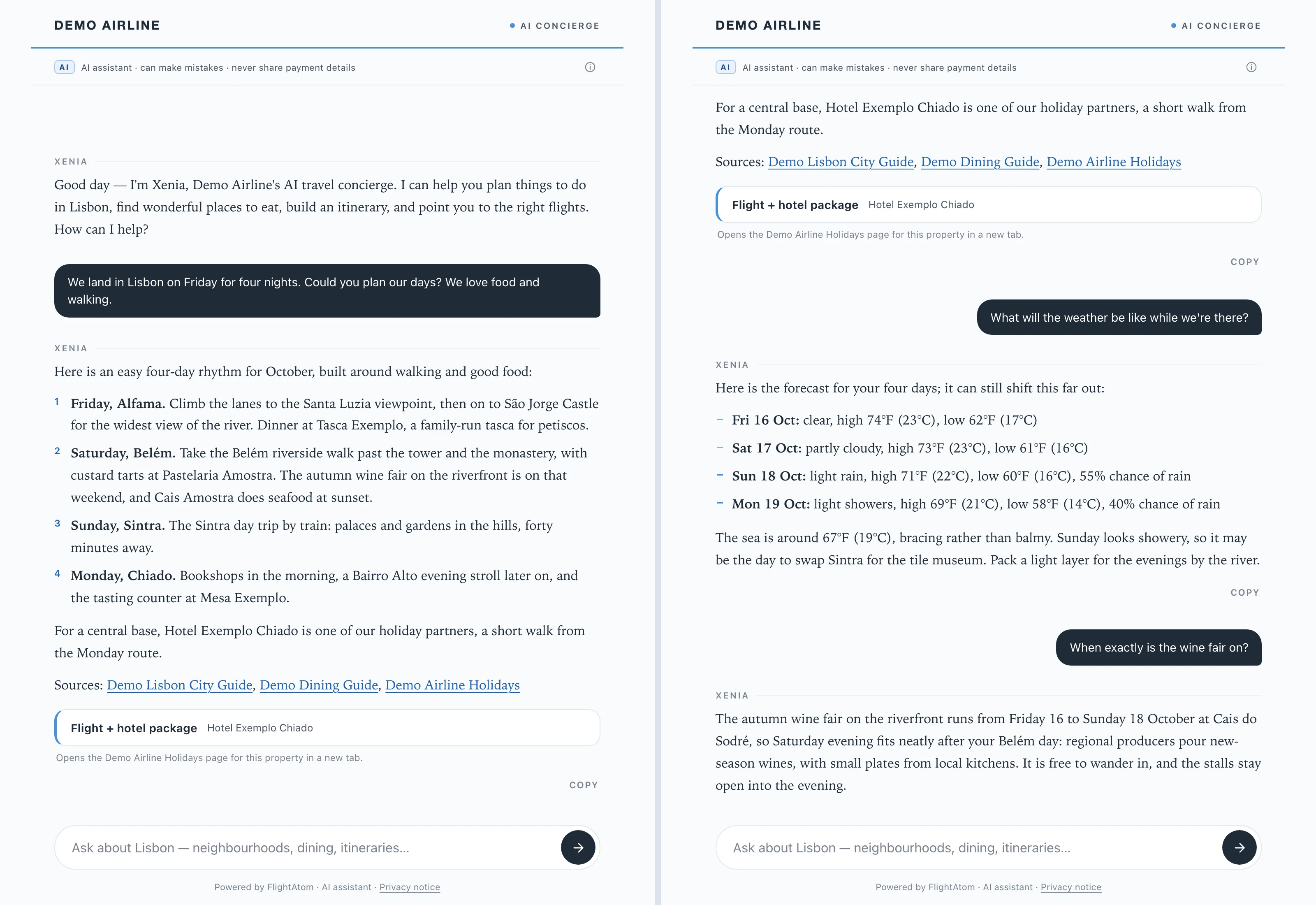
Plan the trip in conversation

Left, XENIA Ai answers a request to plan four nights in Lisbon with a day-by-day plan drawn from approved knowledge entries, links to its sources and a flight + hotel package button added by code. Right, follow-up questions bring in the forecast with sea temperature and the dates of a seasonal event. Reply wording in both views is scripted for this demo. Synthetic demonstration data.

Two views of the XENIA Ai chat for a fictional Demo Airline, with its permanent AI label. Left: a traveller asks for four nights in Lisbon around food and walking, and XENIA Ai gives a day-by-day plan (Alfama, Belém, Sintra, Chiado) with fictional venues, a partner hotel, links to three demo sources and a Flight + hotel package button. Right: follow-ups bring a four-day forecast in °F and °C with rain chances, a sea temperature of 67°F (19°C), a suggestion to swap Sintra for the tile museum on the showery day, and the dates of an autumn wine fair. Synthetic demonstration data.
Plan the trip in conversationDemonstration data · Click to enlarge
02 / XENIA Ai

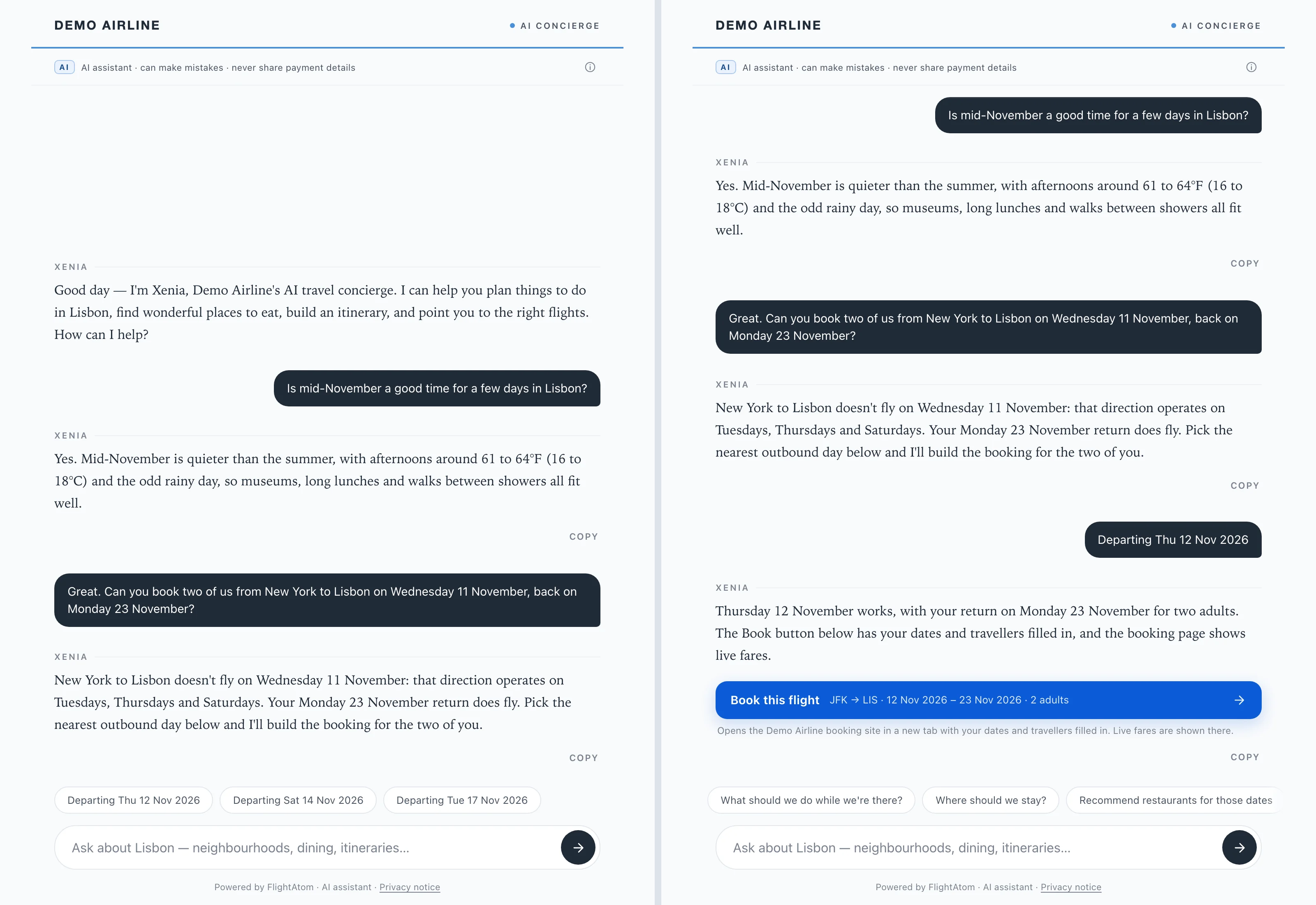
A Book button built by code

Left, code checks the requested date against the schedule, finds that New York to Lisbon does not fly that Wednesday, and offers the next days that direction flies as tap-to-answer chips. Right, the tapped day becomes a Book button with route, dates and travellers filled in, followed by suggested next questions. Reply wording in both views is scripted for this demo. Synthetic demonstration data.

Two views of the XENIA Ai chat for a fictional Demo Airline. Left: a traveller asks to book two people from New York to Lisbon on Wednesday 11 November, back Monday 23 November; XENIA Ai replies that this direction flies only on Tuesdays, Thursdays and Saturdays and that the return does fly, and three chips offer departures on 12, 14 and 17 November. Right: after the Thursday chip is tapped, a blue Book this flight button reads JFK to LIS, 12 Nov 2026 to 23 Nov 2026, 2 adults, with a note that live fares are shown on the booking site, and follow-up question chips. Synthetic demonstration data.
A Book button built by codeDemonstration data · Click to enlarge
03 / XENIA Ai

Group enquiries through a consented form

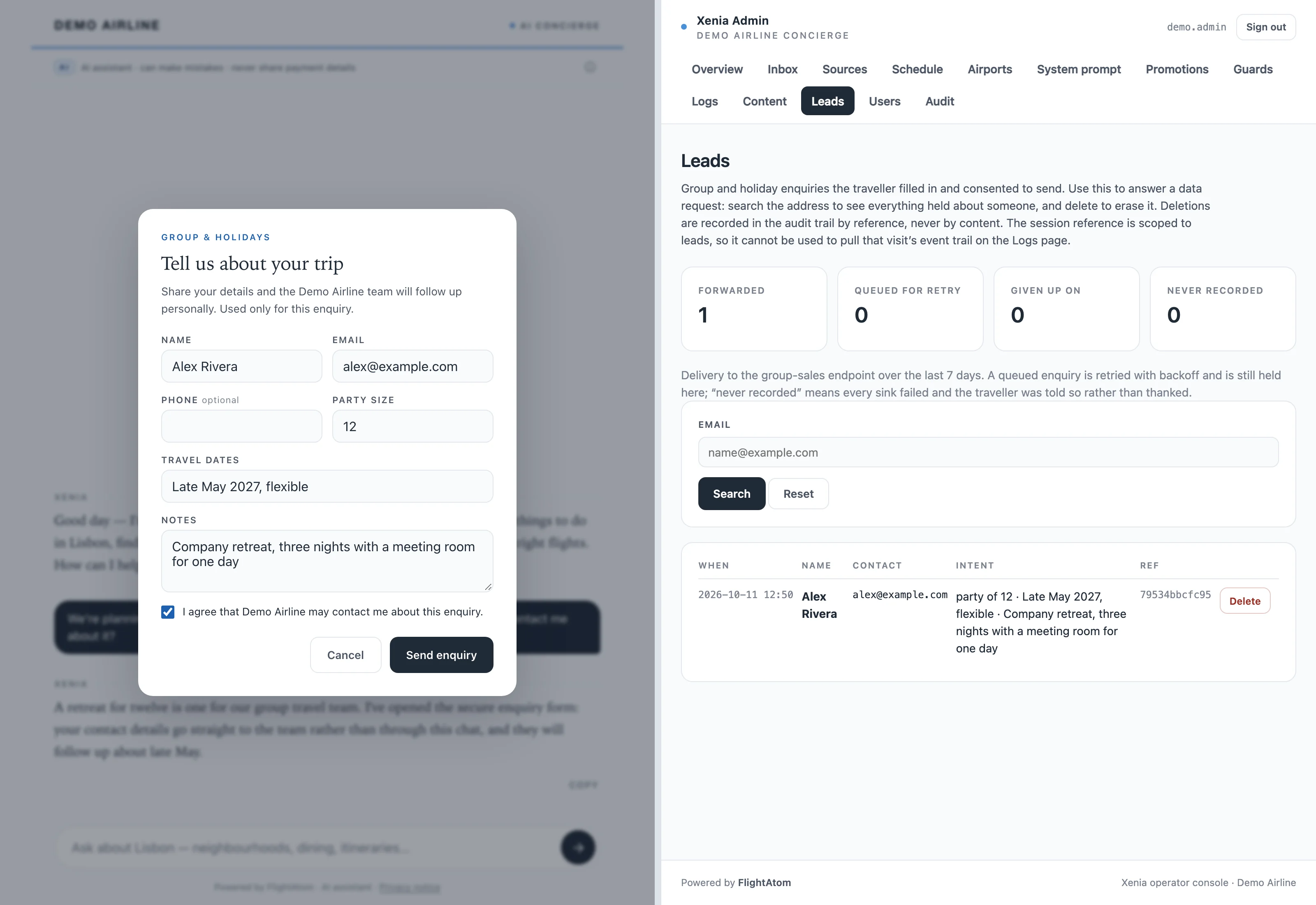
Left, a group request opens XENIA Ai's separate enquiry form, prefilled with party size, dates and the trip purpose, where the traveller enters their own contact details and ticks the consent box. Right, the console's Leads page shows the recorded enquiry and that it was forwarded. Synthetic demonstration data.

Left: the XENIA Ai chat dimmed behind a Group & Holidays enquiry form filled in for Alex Rivera (alex@example.com), a party of 12 in late May 2027 for a company retreat with a meeting room, with the box ticked agreeing that Demo Airline may contact them, and a Send enquiry button. Right: the Xenia Admin console Leads page, with delivery tiles showing one enquiry forwarded and none queued, given up on or never recorded, an email search, and the single enquiry row with a hashed reference and a Delete button. Synthetic demonstration data.
Group enquiries through a consented formDemonstration data · Click to enlarge
04 / XENIA Ai

A live agent, only after consent

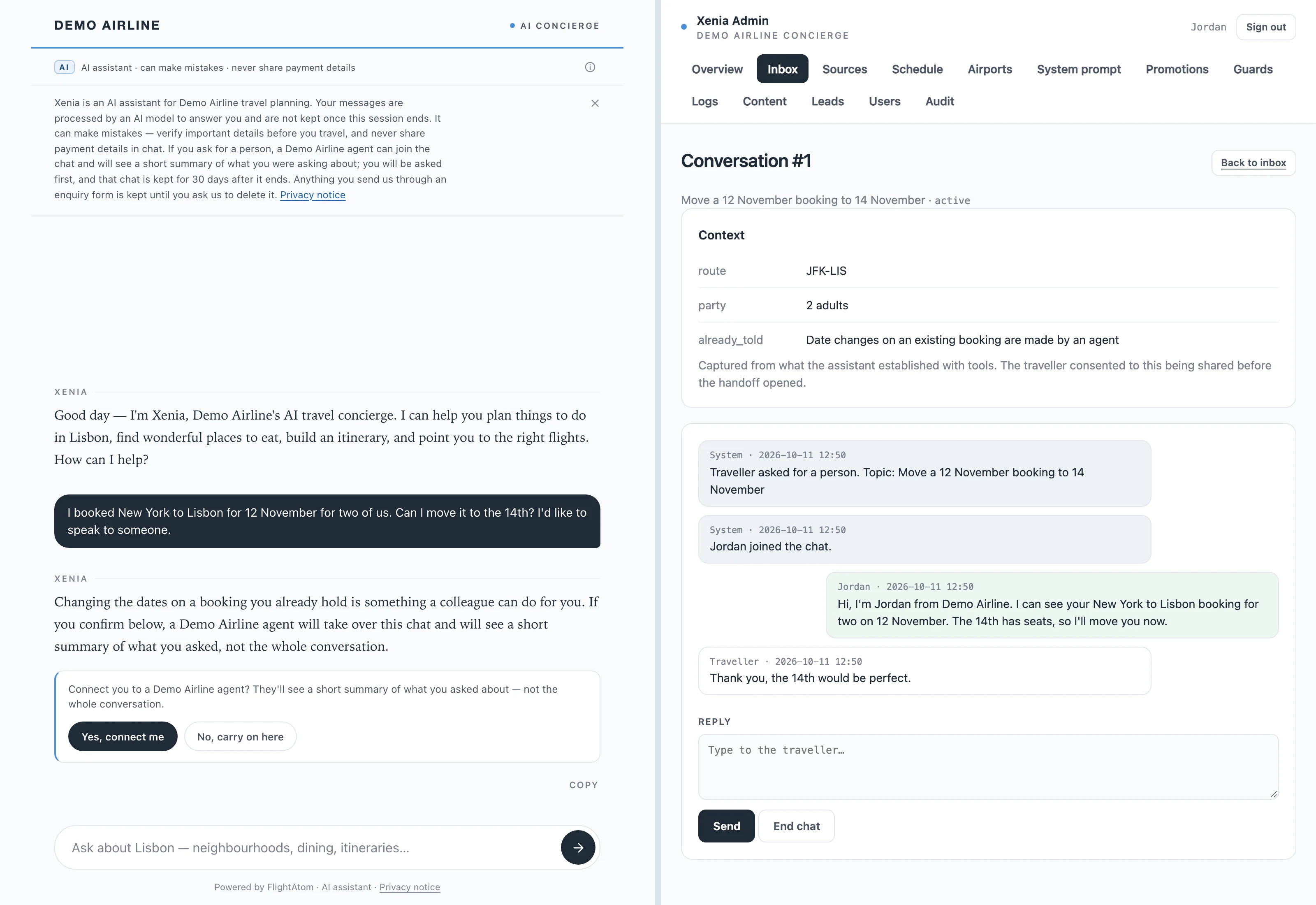
Left, XENIA Ai explains that an agent can take over and shows code-drawn Yes, connect me and No, carry on here buttons. Right, after the traveller confirms, the agent's console shows a short context brief instead of the transcript, followed by the agent's reply and the traveller's answer. XENIA Ai's reply and the brief's wording are scripted for this demo. Synthetic demonstration data.

Left: the XENIA Ai chat with its AI disclosure open, explaining that a Demo Airline agent can join and will see a short summary after asking first. A traveller asks to move a New York to Lisbon booking from 12 to 14 November and to speak to someone; XENIA Ai offers a colleague, and a box asks to connect them with Yes, connect me and No, carry on here buttons. Right: the console signed in as agent Jordan, showing the conversation topic, a Context brief (route JFK-LIS, party 2 adults, what the traveller was already told), Jordan's reply and the traveller's thanks. Synthetic demonstration data.
A live agent, only after consentDemonstration data · Click to enlarge
05 / XENIA Ai

Every reply checked before display

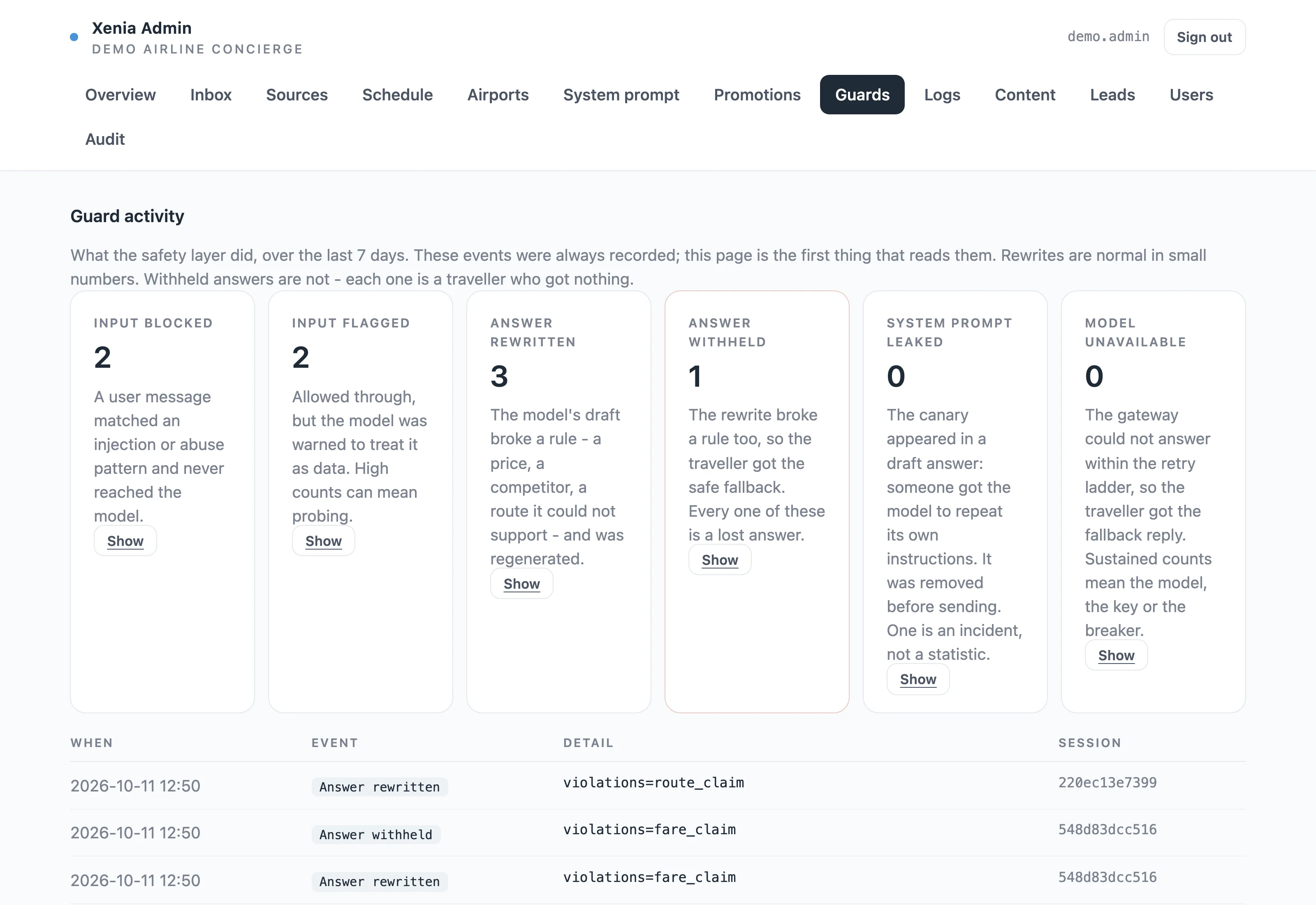
The console's Guard activity page counts traveller messages blocked or flagged by the input guard, drafts rewritten after breaking a reply rule (here an unsupported route claim and a quoted price), and one answer withheld after its rewrite broke the rule again. It lists the rule that fired rather than what was said. Synthetic demonstration data.

The Xenia Admin console Guards page for the Demo Airline concierge, showing Guard activity over the last 7 days in six cards: Input blocked 2, Input flagged 2, Answer rewritten 3, Answer withheld 1 (outlined in red), System prompt leaked 0 and Model unavailable 0, each with an explanation and a Show button, above a table of recent events with times, Answer rewritten violations=route_claim, Answer withheld violations=fare_claim and Answer rewritten violations=fare_claim, with hashed session identifiers; with synthetic demonstration data.
Every reply checked before displayDemonstration data · Click to enlarge
06 / XENIA Ai

Schedule changes need approval

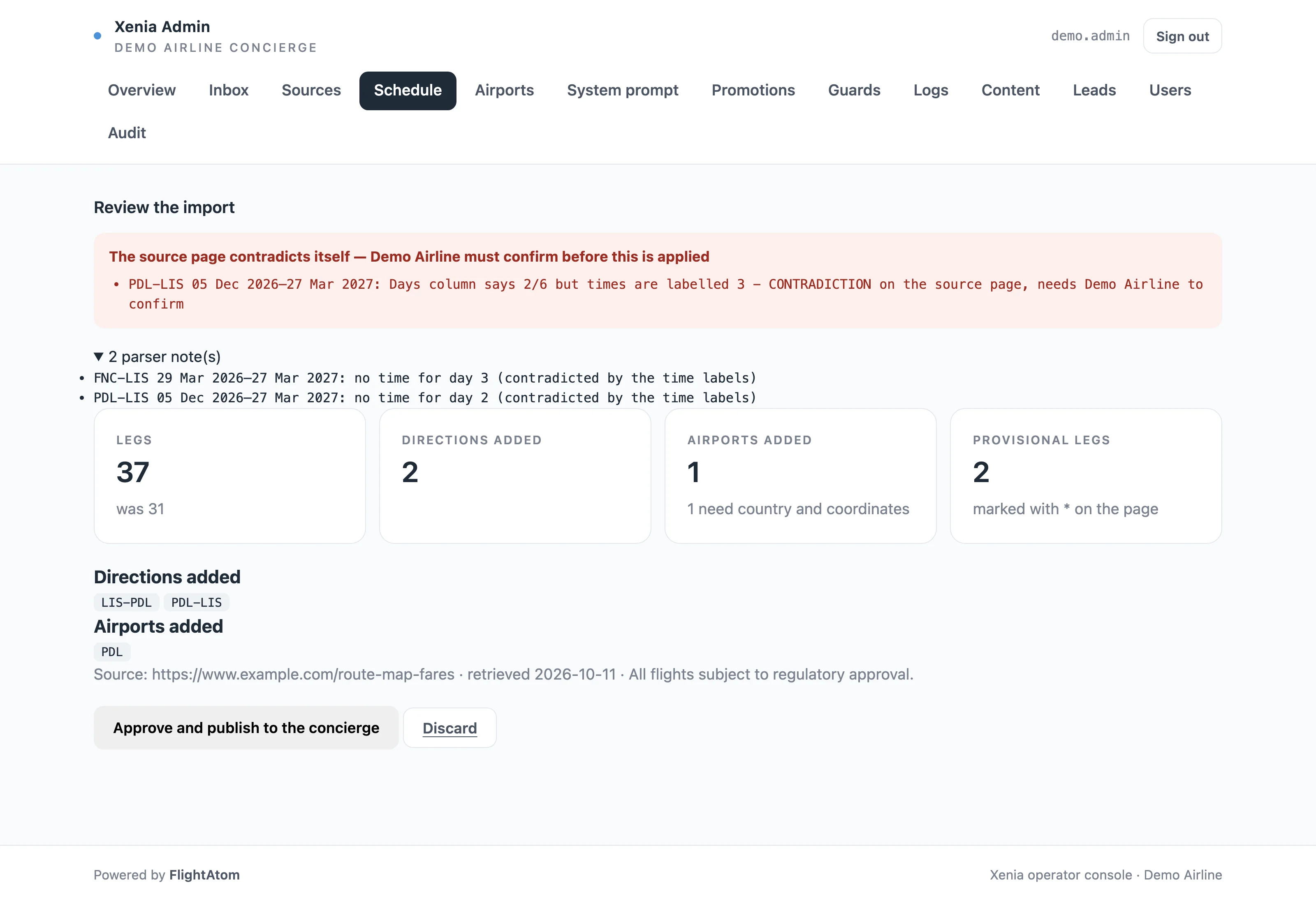
An editor fetches the published timetable and reviews a deterministic import diff: the contradiction the parser found on the source page, parser notes, legs before and after, new directions, a new airport that still needs coordinates, and provisional legs. Nothing is published until the editor approves. Synthetic demonstration data.

The Xenia Admin console Schedule page headed Review the import. A red warning says the source page contradicts itself and Demo Airline must confirm before it is applied: for PDL-LIS the Days column says 2/6 but the times are labelled 3. Below are two parser notes, tiles for 37 legs (was 31), 2 directions added, 1 airport added that still needs country and coordinates and 2 provisional legs, the added directions LIS-PDL and PDL-LIS, a source line for an example.com timetable, and Approve and publish to the concierge and Discard buttons. Synthetic demonstration data.
Schedule changes need approvalDemonstration data · Click to enlarge
07 / XENIA Ai

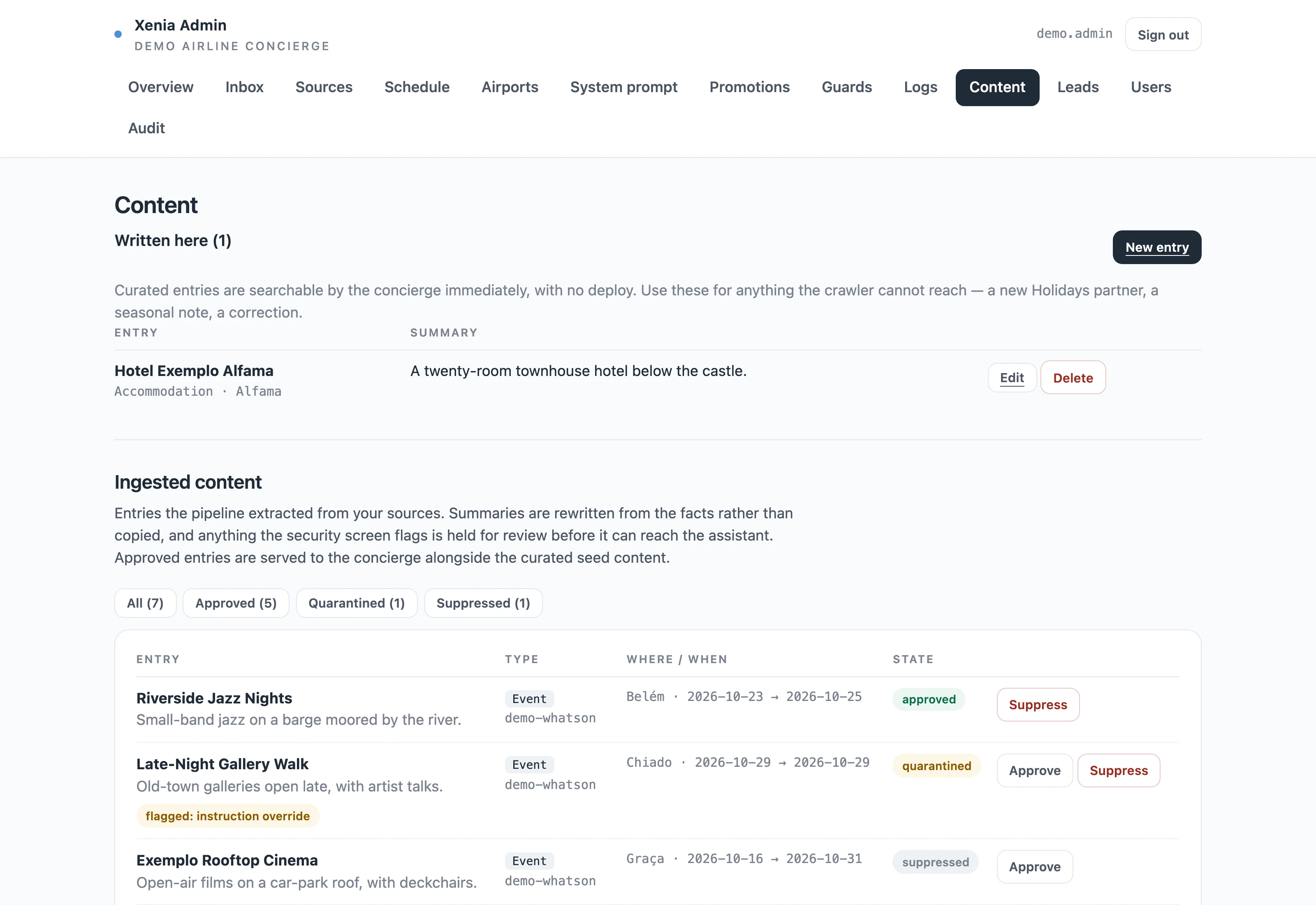
Editors control the knowledge base

The console's Content page lists an entry written by an editor and crawled entries that are approved, quarantined because the security screen found an instruction in the source text, or suppressed by an editor. The concierge picks up curated and approved entries at its next refresh, within about a minute, with no deploy. Crawled summaries are scripted for this demo. Synthetic demonstration data.

The Xenia Admin console Content page for the Demo Airline concierge. A Written here section lists one editor-written entry, Hotel Exemplo Alfama. Below, the Ingested content table from the source demo-whatson shows Riverside Jazz Nights in Belém, 23 to 25 October, approved; Late-Night Gallery Walk in Chiado, 29 October, quarantined and flagged instruction override, with Approve and Suppress buttons; and Exemplo Rooftop Cinema in Graça, 16 to 31 October, suppressed, with an Approve button. Synthetic demonstration data.
Editors control the knowledge baseDemonstration data · Click to enlarge
Capabilities

From the first question to the Book button.

Each capability keeps the conversation useful to the traveller and accountable to the airline.

A prefilled Book button, only for days the schedule flies

Before a Book button appears, code checks each travel date against the days that direction operates and the schedule's effective dates, and limits the departure to 330 days ahead, the trip to 60 days and the party to nine seated travellers. The button opens the airline's booking engine with the route, dates and party filled in, and its link carries UTM campaign tags and a hashed session key, so the airline's own analytics can attribute booking-engine visits to the chat. Each click on it is recorded with the route, direction and prompt version from the server's own records.

Offer the next flying day, not a dead end

When a date, route or party size cannot be booked, XENIA Ai offers one-tap alternatives built by code, never written by the model: the next days that direction flies, other gateways serving the destination, other destinations from the same origin, or a valid party size. A day the published timetable contradicts is treated as unconfirmed and never offered. Once a booking link exists, the suggestions turn to the natural next questions about the trip.

Describe the network as it actually flies

Travellers get answers that follow the network as it operates: separate outbound and return days, seasonal start dates, nonstop and connecting service, provisional flights and routes from gateways other than the hub. A direction-aware network registry is XENIA Ai's only source for where and when the airline flies, so a seasonal route is described by the day it starts rather than as not served.

Hand over to a live agent with consent

XENIA Ai knows whether an agent is on duty before it offers a handoff, and the transfer happens only after the traveller presses a confirm button. The agent receives a short summary with contact details removed rather than the transcript, replies in the same widget, and the AI stays silent meanwhile. The inbox-only agent role cannot see or change the AI configuration.

Offer packages and capture group enquiries

When XENIA Ai recommends one of the airline's holiday-partner properties, the server adds a flight-and-hotel package button built from the property's own approved link. Group enquiries use a separate form with explicit consent, so contact details never pass through the AI, and the traveller is thanked only after the enquiry is recorded in the console, a database or the CRM delivery queue. Administrators see how many were forwarded or are still queued for retry, and can find and delete a traveller's enquiries in the console by email address.

Plan the whole trip in conversation

Travellers ask about things to do, dining, seasons, events and where to stay, and XENIA Ai builds day-by-day itineraries around their interests and travel month. It brings current conditions, a forecast up to ten days ahead and sea temperature into the conversation for network destinations, and keeps forecasts separate from seasonal guidance.

Recommend and answer from approved sources

Recommendations, and answers about the airline's own cabin, baggage allowances and what each fare family includes, come from a curated knowledge base searched by keyword, with filters for type, interests and travel month. Every result carries its approved source, expired and out-of-season events are left out, and facts past their review date, 90 days for entry rules, are given with an 'as of' date rather than presented as current.

Approve schedule changes, edit content without a deploy

A deterministic timetable importer shows routes added or removed, new airports, provisional flights and contradictions in the source, and publishes only after an editor approves; an unusable update keeps the last good schedule in service. Editors also write and edit knowledge entries, suppress any crawled entry and run dated promotions that change ranking but never facts, and changes reach the concierge within about a minute.

Change the prompt safely, then see what happened

Prompt versions are audited and reversible, and a draft that drops its safety variables or contains a credential is rejected. Before activation, a draft can be run against fixed safety probes scored by the same guard the live concierge uses. The console then shows guard rewrites, withheld answers, prompt-leak alerts, model outages and token use, without storing what travellers said.
Applied AI

Generative where it helps. Deterministic where it matters.

A generative model holds the conversation and plans the trip. The schedule data, the Book button and the final check on every reply are handled by deterministic code.

A model for the conversation, code for the facts

XENIA Ai calls a fixed set of server-validated tools whenever an answer depends on the schedule, the knowledge base, the weather, a booking, an enquiry or a person. The Book button, package buttons and follow-up suggestions are built by server code from approved records, never written by the model.

Every reply checked before it is shown

Deterministic code checks each full draft before any of it streams. A reply that quotes a price, names another airline, claims a route the schedule does not support or states entry rules without the official government link and a prompt to check with the authorities is rewritten once, and otherwise replaced with a safe answer and official links. Contact details the model repeats are masked.

Original summaries from screened sources

An ingestion pipeline crawls operator-registered sources on a schedule, respects robots.txt and uses AI to rewrite the facts it extracts into original summaries. Crawled entries that contain instruction-like text are quarantined before they can be used, hidden text is flagged when an operator previews a new source, and operators can suppress any crawled entry at any time.

Evaluate XENIA Ai

Make the next step measurable.

Agree a representative sample and a baseline from your current process. These are proposed evaluation measures, not published performance results.

Bring a representative example

Approved destination content and representative travel enquiries.

Inspect the complete workflow

Review the answer, consented enquiry, booking link, and human-support handoff.

Compare with your baseline

Enquiry completeness; handoff completion; answer usefulness.

Questions & answers

Before you book a demo.

Is XENIA Ai a standalone product?

Yes. XENIA Ai has its own travel concierge, knowledge and network tools, and operator console, and it does not require AURORA Ai. It is added to an airline website with one script tag; the chat runs in an isolated frame that loads only when a traveller opens it, carries a permanent AI label, and brings no third-party scripts, fonts or tracking pixels.

Can XENIA Ai quote live fares?

No. XENIA Ai does not quote fares or seat availability, and its reply check rewrites answers that quote a price. It opens the airline's booking engine with the route, dates and party already filled in, where current fares are shown.

Can XENIA Ai offer a flight the airline doesn't operate?

XENIA Ai takes routes and operating days from the airline's network registry, its only source for where and when the airline flies. The Book button is built by code and refuses a date that direction does not operate, offering the next days it does fly instead. A day the published timetable contradicts is treated as unconfirmed and is never offered for booking.

How is XENIA Ai protected against prompt injection?

Traveller messages are normalised and screened for injection patterns and encoded payloads before they reach the model. Tool results are fenced with a per-turn boundary token, and a reply that repeats the system prompt's hidden canary is rewritten and flagged in the console. Crawled entries containing instruction-like text are quarantined, and hidden text is flagged when an operator previews a new source. Every reply is checked by deterministic code, and links in replies render only for approved domains.

Does XENIA Ai keep traveller conversations?

Not beyond the session, with one exception: live-agent chats are kept in the console and deleted 30 days after they close. XENIA Ai has no traveller accounts and no memory between sessions, and email addresses, phone numbers and card numbers are removed before a message reaches the AI model. Analytics events hold no conversation text and are kept for up to 30 days, and each reply is recorded as a one-way digest so a disputed answer can be checked without keeping the words.

How does a traveller reach a person?

When an agent is on duty, XENIA Ai can offer a live handoff, and the transfer happens only after the traveller presses a confirm button. The agent receives a short summary with contact details removed rather than the full transcript, replies through the same widget, and the AI stays silent while the agent takes over. Group and package enquiries use a separate consented form.

What happens if the AI model is unavailable?

XENIA Ai retries the model within the turn, then tries the next model on the deployment's fallback list. If none answers, the traveller gets a short fixed reply with links to booking and travel information instead of an error, and after repeated failures new turns fail fast rather than wait. A maintenance mode can also be switched on, which shows a limited-mode notice and replies with the same links. The console counts the turns the model could not answer.

Can the airline control what XENIA Ai says?

Yes. In a separate operator console, editors write and edit knowledge entries, register sources for screened ingestion, suppress any crawled entry, run promotions that change ranking but never facts, and approve schedule imports after reviewing what changed. System prompts are versioned, audited and reversible, and a draft can be run against fixed safety probes before it is activated.

How does XENIA Ai connect to CARE Ai?

XENIA Ai remains a separate travel concierge. The optional CARE Ai bridge provides a staff chat inbox and concierge administration while XENIA Ai retains its own records. In the CARE Ai integration, a confirmed handoff also shows the agent the conversation with contact and card details removed, plus the reasons for the handoff.

What happens to XENIA Ai when our operation grows or changes?

As your fleet, routes, rules or teams change, we adapt XENIA Ai to match, and you approve each change before it goes live.

See XENIA Ai in action

Start with your workflow.

A focused walkthrough, with the people and decisions that matter to your team.

Request a demo